PL Stream–Based YOLO Tails#
Starting from Vitis-AI 6.1, the release includes examples of YOLO tails implemented on the Programmable Logic (PL). The following tails are available:
NPU_TAIL_YOLO_V5NPU_TAIL_YOLO_V7NPU_TAIL_YOLO_V8NPU_TAIL_YOLO_X
Description#
The user has the following options for YOLO acceleration.
1. Run only the AI part on AIE
In this mode, the AI portion of the model runs on AIE, and the end of the graph (for example, coordinate correction) is handled manually by the user application. This can be implemented using ONNX Runtime or custom user code.
2. Run the entire model on AIE (AI + tail)
This mode has been available since Vitis-AI 5.1.
To enable this mode, set the precision to MIXED or BF16, because the end of the graph requires extended precision:
VAISW_FE_PRECISION=MIXED
In this configuration, the entire model is accelerated on AIE. However, AIE engines are not optimized for processing the tail of the graph, so the efficiency of this portion is relatively low.
3. Run the AI part on AIE and the tail on PL (stream-based)
Vitis-AI 6.1 introduces a new PL tail architecture in which data is streamed directly from AIE through PL computation logic before reaching DDR. This architecture significantly reduces DDR bandwidth usage and tail latency.
In this mode:
AIE computes AI operations.
PL logic handles non-AI operations.
This configuration delivers the highest overall performance.
To enable this mode:
Set the precision to INT8.
Compile the tail of the model and include it as a PL kernel.
Note
The PL tail must be explicitly compiled and integrated into the system design.
Architecture Overview#
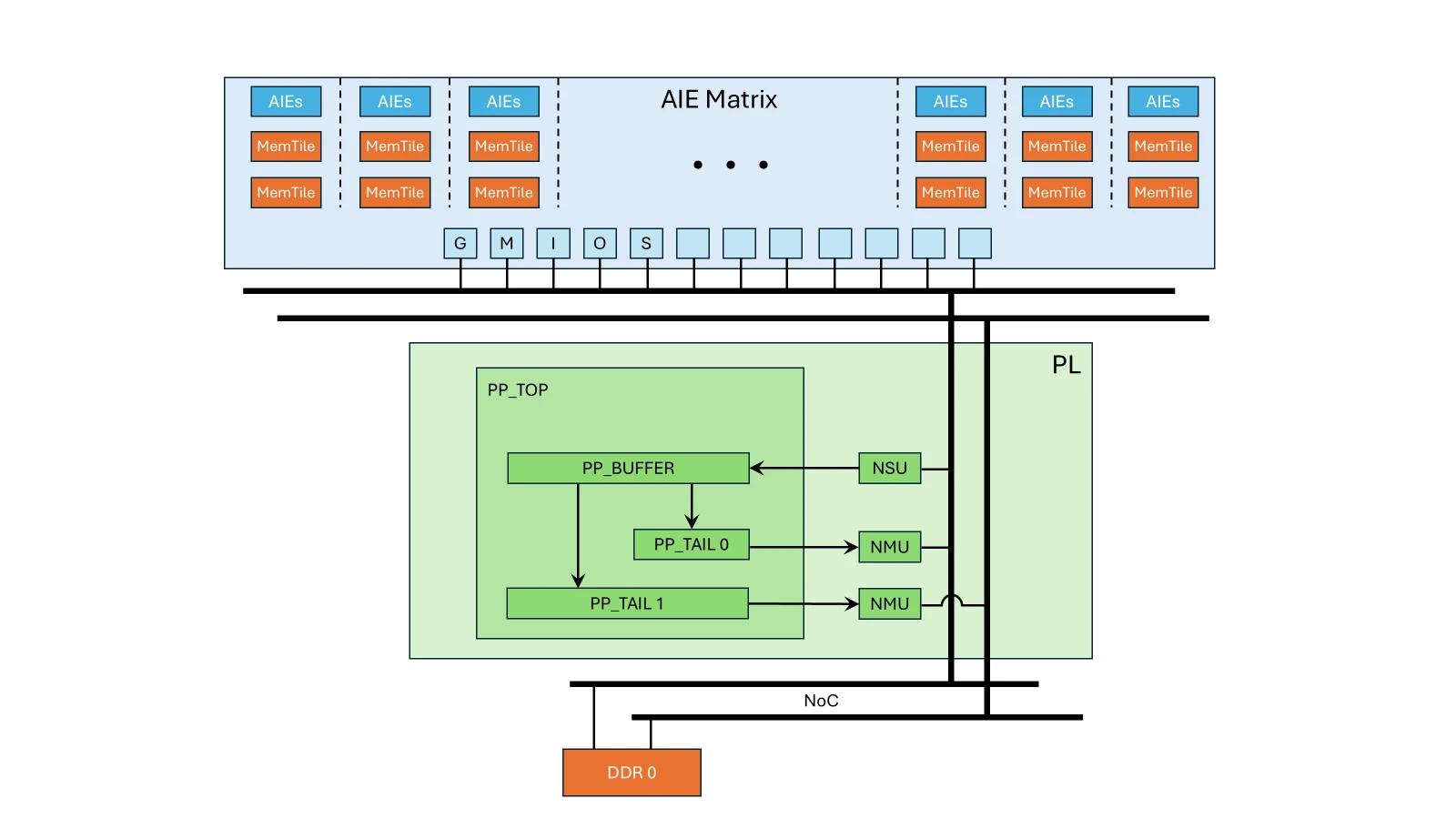
Goals#
The goal of this example is to provide a reference RTL design that demonstrates stream-based processing (YOLO tails) to users. You can use this design as a starting point to implement custom PL processing and connect it to AIE execution.
In Vitis-AI, the PL stream is implemented using a dedicated platform because integration as a standard Vitis kernel could not be achieved.
The example targets:
The VEK280 board
A platform with three DDRs connected to the AIE
The provided build scripts generate a system with:
One NPU IP
One TAIL IP
Building a TAIL IP with multiple NPU IPs is possible but not implemented in the provided scripts.
Build Design with YOLOX Tail PL#
To enable a PL tail IP during SD card preparation, add the tail IP to the
npu_ip settings.
For example, the following commands build an SD card with the full configuration of VE2802 NPU IP and the YOLOX tail:
$ source <path-to-installed-Petalinux-v2025.2>/settings.sh

$ source <path-to-installed-Vitis-v2025.2>/settings64.sh

$ export PATH=$PATH:/usr/sbin

$ export XILINXD_LICENSE_FILE=<path_to_npu_ip_license_file>

$ cd <path_to_Vitis-AI_source_code>/Vitis-AI

$ source npu_ip/settings.sh VE2802_NPU_IP_O00_A304_M3 NPU_TAIL_YOLO_X

$ make -C examples/reference_design/vek280 all BSP_PATH=<path_to_vek_bsp>.bsp
The above commands help to generate the SD Card VE2802_NPU_IP_O00_A304_M3__YOLO_X_sd_card.img in the path of “Vitis-AI/examples/reference_design/vek280/output/”.
Note
All tails have been verified on the full configuration VE2802 IP, and the YOLOv5 tail has been verified on the VE2302 IP. Because PL stream compilation involves RTL synthesis, placement, and routing, this phase is more susceptible to timing violations depending on available resources, clock constraints, and device grade. Standard Vivado debugging techniques (directive selection, frequency tuning) may be required.
Snapshot Generation with PL Stream Architecture#
To generate a snapshot compatible with the PL stream architecture, use the following option:
VAISW_IRIZ_TRANSFORMFORCEENABLE=SkipDepthFriendlyLeaf
Once a snapshot is generated, use the script
Vitis-AI/bin/pl_stream_config.bash to create a PL configuration file.
Example:
$ cd <path_to_Vitis-AI_source_code>/Vitis-AI

$ source npu_ip/settings.sh VE2802_NPU_IP_O00_A304_M3 NPU_TAIL_YOLO_X

$ ./docker/run.bash --acceptLicense -- /bin/bash -c \
  "source npu_ip/settings.sh && \
  cd /home/demo/YOLOX && \
  VAISW_IRIZ_TRANSFORMFORCEENABLE=SkipDepthFriendlyLeaf \
  VAISW_QUANTIZATION_NBIMAGES=1 \
  VAISW_SNAPSHOT_DIRECTORY=$PWD/YOLOX.b1.pl \
  ./run assets/dog.jpg m --save_result"

# Install *jq* tool (skip this step if its already installed)
$ sudo apt install -y jq

$ bin/pl_stream_config.bash YOLOX.b1.pl > YOLOX.b1.pl/pl_config.json
The above commands help to generate the YOLOX.b1.pl snapshot which can be copied to VEK280 board for execution.
Running Snapshot on the Board#
The generated PL configuration file can be passed to the embedded software stack
using the VAISW_PL_JSON_PATH environment variable.
On the target board:
Ensure that you have completed the SD Card and target board setups. Refer to Installation for more information.
Insert the SD card into the VEK280 board and power the board on.
Log in with the username
rootand passwordroot.Copy YOLOX.b1.pl snapshot to target board.
$ scp <path_to_YOLOX.b1.pl_folder>/YOLOX.b1.pl root@vek280_board_ip:/root/
Set up the Vitis AI tools environment on the board.
$ source /etc/vai.sh
Export the following macro to compute performance statistics by the embedded software stack.
$ export VAISW_RUNSESSION_SUMMARY=all
Run the YOLOX tail on the CPU.
$ cd /root
$ vart_ml_runner.py --snapshot YOLOX.b1.pl --in_zero_copy --out_zero_copy
The above command executes the YOLOX tail on CPU and outputs the performance details to the console, as illustrated in the following table.
[VART]
[VART]           board VE2802 (AIE: 304 = 38x8)
[VART]           10 inferences of batch size 1 (the first inference is not used to compute the detailed times)
[VART]           1 input layer. Tensor shape: 1x640x640x4 (INT8)
[VART]           1 output layer. Tensor shape: 1x8400x85 (FLOAT32)
[VART]           2 total subgraphs:
[VART]                   1 VART (AIE) subgraph
[VART]                   1 Framework (CPU) subgraph
[VART]           10 samples
[VART]
[VART] "wrp_network" run summary:
[VART]           detailed times in ms
[VART] +--------------------------------+------------+------------+------------+------------+
[VART] | Performance Summary            |  ms/batch  |  ms/batch  |  ms/batch  |   sample/s |
[VART] |                                |    min     |    max     |   median   |   median   |
[VART] +--------------------------------+------------+------------+------------+------------+
[VART] | Whole Graph total              |      19.05 |      21.42 |      19.23 |      52.01 |
[VART] |   VART total (   1 sub-graph)  |       4.19 |       4.23 |       4.20 |     238.04 |
[VART] |     AI acceleration (*)        |       2.78 |       2.79 |       2.78 |     359.71 |
[VART] |     CPU processing             |       1.41 |       1.44 |       1.42 |            |
[VART] |       Output copy (phys->user) |       1.15 |       1.18 |       1.16 |            |
[VART] |       Others                   |            |            |       0.26 |            |
[VART] |   OnnxRT CPU (   1 sub-graph)  |      14.71 |      17.06 |      14.90 |            |
[VART] |   Others                       |            |            |       0.13 |            |
[VART] +--------------------------------+------------+------------+------------+------------+
Run the YOLOX tail on the PL.
$ VAISW_PL_JSON_PATH=YOLOX.b1.pl/pl_config.json VAISW_XRT_DISABLE=true vart_ml_runner.py --snapshot YOLOX.b1.pl --in_zero_copy --out_zero_copy
The above command executes the YOLOX tail on the PL and outputs the performance details to the console, as illustrated in the following table.
[VART]
[VART]           board VE2802 (AIE: 304 = 38x8)
[VART]           10 inferences of batch size 1 (the first inference is not used to compute the detailed times)
[VART]           1 input layer. Tensor shape: 1x640x640x4 (INT8)
[VART]           1 output layer. Tensor shape: 1x8400x85 (FLOAT32)
[VART]           1 total subgraph:
[VART]                   1 VART (AIE) subgraph
[VART]                   0 Framework (CPU) subgraph
[VART]           10 samples
[VART]
[VART] "wrp_network" run summary:
[VART]           detailed times in ms
[VART] +--------------------------------+------------+------------+------------+------------+
[VART] | Performance Summary            |  ms/batch  |  ms/batch  |  ms/batch  |   sample/s |
[VART] |                                |    min     |    max     |   median   |   median   |
[VART] +--------------------------------+------------+------------+------------+------------+
[VART] | Whole Graph total              |       2.96 |       2.97 |       2.97 |     337.15 |
[VART] |   VART total (   1 sub-graph)  |       2.88 |       2.89 |       2.88 |     347.34 |
[VART] |     AI acceleration (*)        |       2.83 |       2.84 |       2.83 |     353.11 |
[VART] |     CPU processing             |       0.05 |       0.05 |       0.05 |            |
[VART] |       Others                   |            |            |       0.05 |            |
[VART] |   Others                       |            |            |       0.09 |            |
[VART] +--------------------------------+------------+------------+------------+------------+
Limitations#
Because the PL tail is not integrated as a Vitis kernel, XRT must be disabled during execution:
VAISW_XRT_DISABLE=true
There is no simulation model for PL execution. As a result, it is not possible to evaluate accuracy using PL stream execution on a CPU-based run.