Default Reference Design#
The Vitis AI provides the reference design, called the X+ML Reference Design, where “X” refers to hardware-accelerated pre-processing tasks, and “Machine Learning” refers to the inference task running on the Neural Processing Unit (NPU). The reference design demonstrates an end-to-end Machine Learning solution, encompassing the entire process from inputting image or video files to generating and storing Machine Learning output.
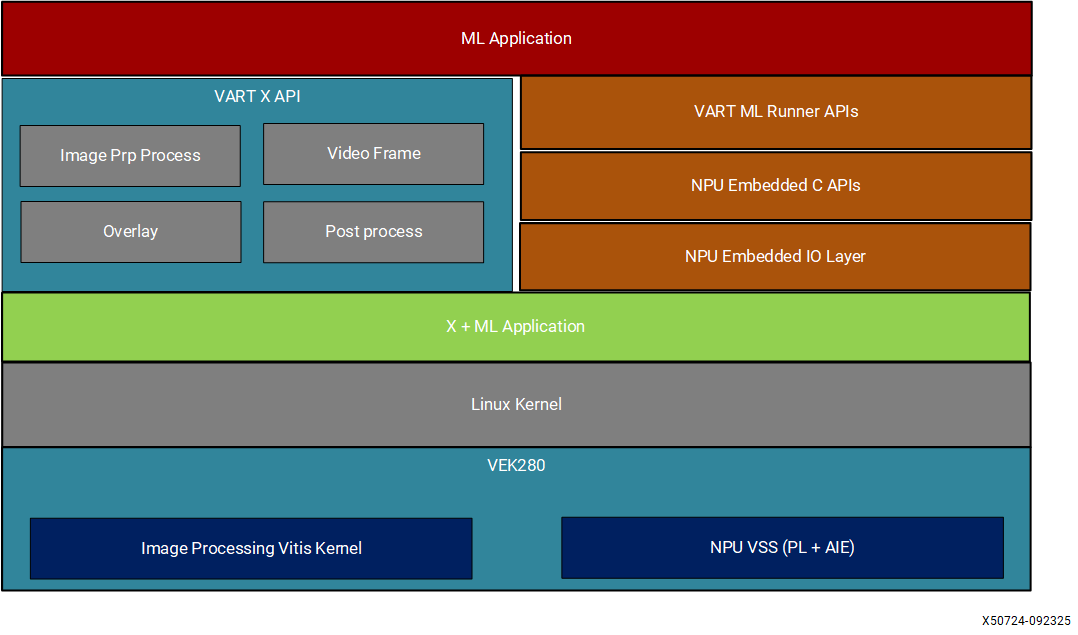
Key functionality of the default Reference Design#
Implements hardware pre-processing using Image Processing PL kernel (including resizing, color space conversion, normalization, and cropping).
Performs inference using the kernelized NPU IP (VE2802_NPU_IP_O00_A304_M3).
Provides software post-processing for ResNet50, SSDResNet34 and YOLOX-m models.
Includes functionality for drawing bounding boxes and text corresponding to the inference results on the input image.
Build the Default Reference Design#
The Vitis AI release package contains both prebuilt binaries and the sources to generate them. The prebuilt binaries include the SD card image, NPU software applications, and X+ML application. You can verify these prebuilt binaries on target hardware, as covered in the Execute Sample Model. Additionally, you have the option to regenerate the binaries from the provided sources. The following steps outline the procedure:
Prerequisites#
Clone Vitis AI source code
Obtain License for NPU IP and Vivado: You need to obtain the licenses for NPU IP and Vivado. Without the license, you receive a synthesis error while building the reference design. Refer to Obtaining License for NPU IP for more details.
Clone Vitis AI Source Code#
Follow these steps to clone the Vitis AI sources:
Clone the Vitis AI source code:
$ git clone -b release/6.3 https://github.com/amd/Vitis-AI.git
Change the directory to the location of source code:
$ cd Vitis-AI/versal_ve
Choose the right NPU IP for setting. Refer to the snapshot generation message for your model. The message shows you which NPU IP is chosen for snapshot generation. You need to use the same NPU IP to build the reference design:
# By default, the VE2802_NPU_IP_O00_A304_M3 (high performance NPU IP) is chosen to generate snapshot and building the reference design.
source npu_ip/settings.sh
Note
The previous command downloads the NPU IP (VE2802_NPU_IP_O00_A304_M3) to ‘Vitis-AI/npu_ip’ path and NPU software packages to ‘Vitis-AI/tools’ path.
export PATH=$PATH:/usr/sbin
Source Required Tools#
source <path-to-installed-Vitis-v2026.1>/settings64.sh
Build Reference Design Binaries#
This step performs the following actions:
Download Docker to create snapshot for ResNet50 model.
Download the pre-compiled Neural Processing Unit Intellectual Property (Neural Processing Unit IP).
Create the Vitis platform using the provided Docker container sources.
Run the Vitis tool to link all hardware accelerator kernels (pre-processing, inferencing).
Create an SD card artifacts (example: VE2802_NPU_IP_O00_A304_M3_sd_card.wic.gz).
export HOME_DIR=<path-to-Vitis-AI>/versal_ve
cd $HOME_DIR

bash
export ENABLE_FREQ_ADJUST=FALSE
cd reference_design/vek280/
bash setup_yocto_host.sh
export XILINXD_LICENSE_FILE=<path_to_NPU_IP_Vivado_licenses>
make all
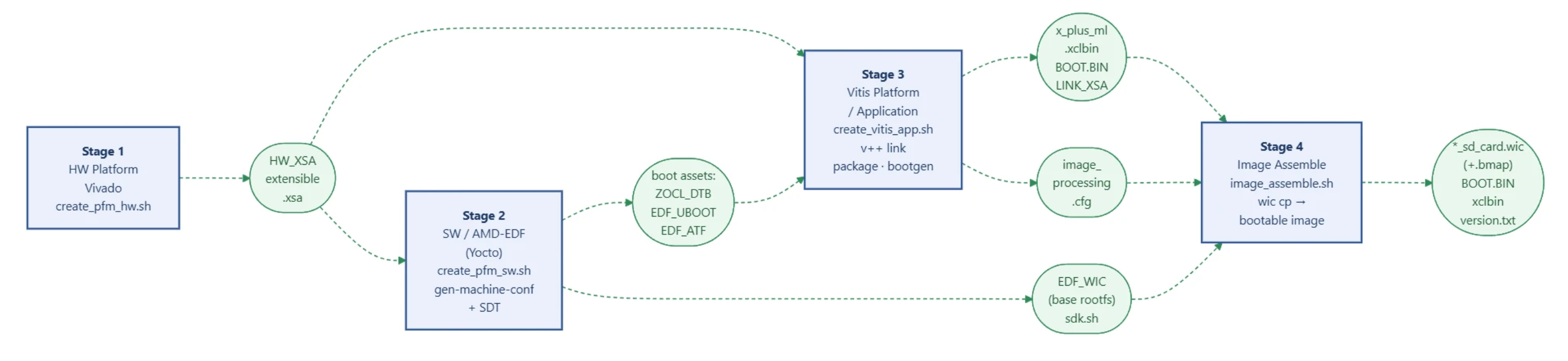
The make all command sources the create_image.sh script, driving four stages in sequence.
Stage 1 — Hardware Platform (create_pfm_hw.sh)
In this stage, the script create_pfm_hw.sh generates the extensible XSA which is a base hw platform from Vivado project. The resulting .xsa is the primary artifact passed to all downstream stages. There is no change from petalinux to amd-edf flow in this stage except for path related changes due to directory restructuring.
Stage 2 — Software Platform (create_pfm_sw.sh)
In this stage, the script create_pfm_sw.sh drives the AMD-EDF Yocto build from XSA to a bootable WIC disk image:
No BSP, no XPFM generation: The PetaLinux BSP is not required anymore. The EDF layer set is fetched at build time via repo sync pinned to the 2026.1 AMD-EDF release. The XSA is consumed directly — no intermediate platform file.
DTSI variant selection: Based on board configuration (number of DDR banks, number of NPU IPs, PL tail presence), the DTSI file is selected.
SDT generation: The XSA is fed to the SDT generator, which emits a System Device Tree — a board-complete device-tree description used as input to all subsequent configuration steps.
Machine configuration: Parses the SDT to produce the Yocto MACHINE configuration (amd-cortexa72-common), setting the toolchain, kernel version, and sysroot parameters for the entire BitBake build.
Device-tree BitBake: Compiles the merged device tree (SDT base + NPU overlay DTSi) into cortexa72-linux.dtb, carrying all AI Engine, ZOCL, and NPU UIO node entries needed for inference.
Boot assets BitBake: Builds ARM Trusted Firmware (ATF) and U-Boot for the Cortex-A72, producing the EDF APU subsystem blob that is later embedded in BOOT.BIN.
Root filesystem BitBake: Builds the full Yocto image including the AI stack: vart (wheel-based pip install), vartml-sw, x-plus-ml, onnxruntime, mipso-udev — all as BitBake recipes in meta-vitis-ai. Output is a WIC disk image with FAT boot partition and ext4 rootfs.
Stage 3 — Vitis Application (create_vitis_app.sh)
In this stage, the script create_vitis_app.sh drives the Vitis application build, which links the pre-processing and inferencing kernels into a single Vitis application. The resulting application is packaged into a wheel file for pip installation on the target.
v++ link: Compiles and links HLS kernels (npu_vss, image_processing, npu_tail, topk) against the extensible XSA generated at stage 1 (no XPFM), producing *_link.xsa.
v++ package: Generates a system PDI and initial xclbin from *_link.xsa.
bootgen: Appends the EDF APU subsystem (ATF + U-Boot + ZOCL DTB) to the PDI, producing the final BOOT.BIN.
Stage 4 — Image Assembly (image_assemble.sh)
In this stage, the script image_assemble.sh assembles the bootable WIC disk image, combining the BOOT.BIN, rootfs.ext4, and xclbin into a single SD card image ready for flashing.
The EDF WIC image from Stage 2 is used as the base disk image.
wic cp injects BOOT.BIN, patched xclbin, image_processing.cfg, and ResNet50 snapshot files into the FAT boot partition.
All artifacts are collected to output/: WIC, bmap, BOOT.BIN, xclbin, utilization reports, SDK, vart-x wheel.
output/sd_card/ provides a minimal SD card file set: BOOT.BIN, xclbin, boot.bif, kernel Image, image_processing.cfg, version.txt.
Note
The default value for
ENABLE_FREQ_ADJUSTis false. If you configureexport ENABLE_FREQ_ADJUST=True, the Vitis design uses postlink scripts to adjust frequencies to avoid timing violations in the design. By defaultENABLE_FREQ_ADJUSTdisables the freqency adjustments from the post link scripts. 2. During reference design build (SD Card compilation), ResNet50 and ResNet101 models are downloaded from TensorFlow hub and a snapshot is generated for the target NPU IP. Downloading models from TensorFlow hub may not work properly depending on tfhub availability. It is possible to skip the models download and snapshot generation using the option SKIP_SNAPSHOT=1 during the SD Card generation, as shown in the following command. make all SKIP_SNAPSHOT=1.
The SD card image gets generated after following the previous steps. Refer to the Set Up/Flash SD Card section in Software Installations for instructions on flashing the SD card and next steps.
Customize the Reference Design#
This section explains how you can customize the Vitis AI (X+ML) reference design for your specific needs. It includes customizing various sections of the Vitis platform, adapting it to other device parts, understanding the Vitis application workspace configurations, and customizing the Vitis workspace for your platforms and kernels.
Introduction to Vitis Embedded Platforms#
The AMD Vitis™ software platform is an environment for creating embedded software and accelerated applications on heterogeneous platforms based on FPGAs, AMD Versal™, and AMD Versal™ Adaptive SoC devices. The Vitis unified software platform provides a Platform + Kernel structure to help you focus on applications. The decoupling of platform and kernel helps make the platform reusable with multiple kinds of kernels and vice versa.
The X+ML reference design is implemented using the Vitis Extensible platform to support the application acceleration development flow and includes hardware for supporting acceleration kernels, controlling the AI Engine on AMD Versal™ Adaptive SoC, and software for a target running Linux and the Xilinx Runtime (XRT) library.
The X+ML reference design has two parts:
Vitis platform created using Vivado, and SDT tools.
Vitis application workspace to build the hardware accelerator kernels such as pre-processing (Image Processing), inferencing (Neural Processing Unit) on top of the Vitis platform.
X+ML Reference Design Directory Structure#
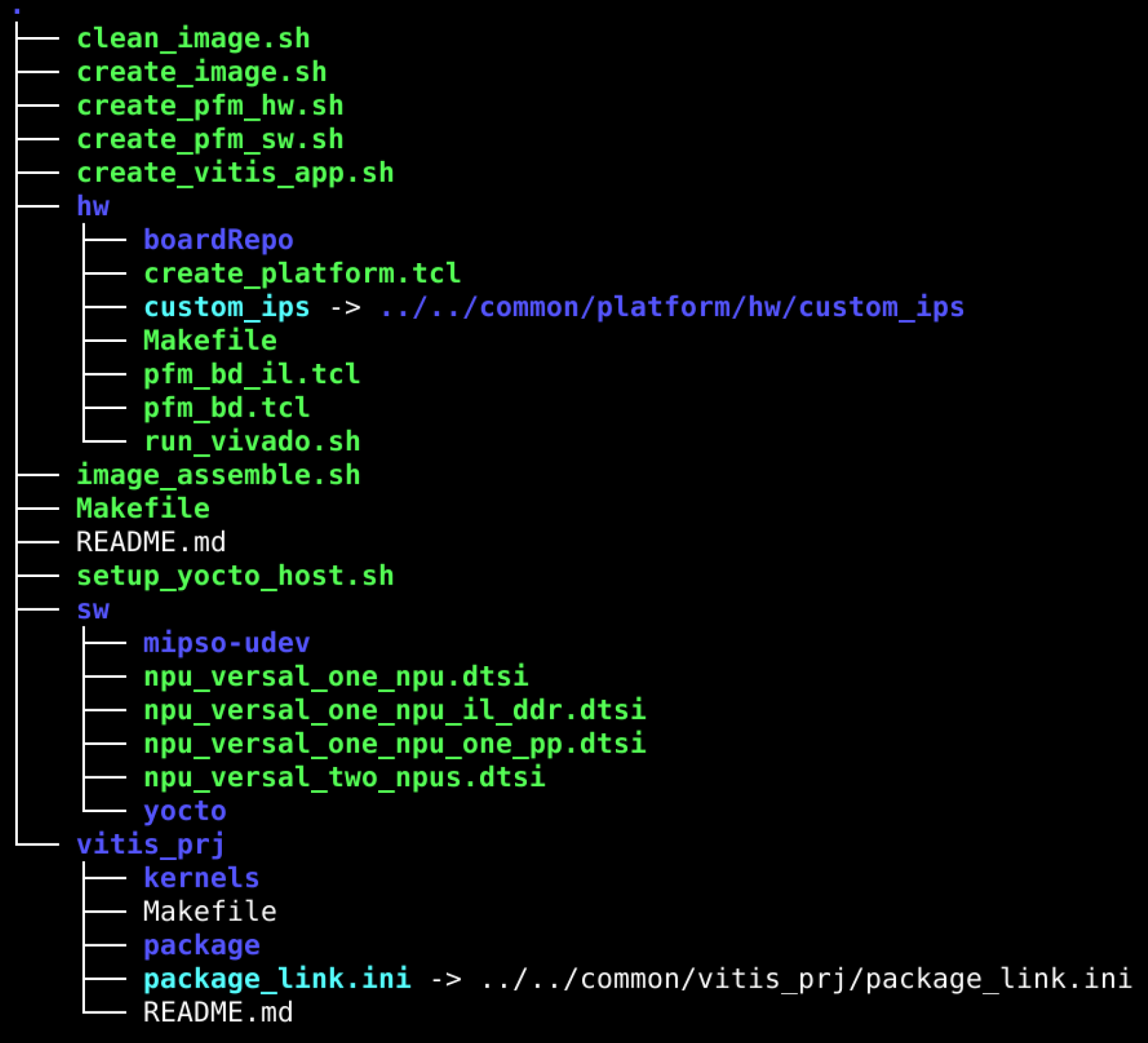
The Vitis AI release package contains the X+ML reference design located at Vitis-AI/versal_ve/reference_design/vek280. It contains the hw folder to build the hardware, sw to build the Yocto software and the vitis_prj folder to build the kernels and create the vek280 target bootable SD card image.
Steps to Build the X+ML Reference Design on Host#
From the provided Docker, build the snapshot for the required NPU kernel. Refer to the snapshot generation message in the terminal. It shows which NPU IP is chosen to generate the snapshot. You need to use the same NPU IP to build the reference design.
Download the same NPU kernel from the
Vitis-AIfolder and set the required environment variables in the terminal:$ cd <path-to-extracted-vitis-ai-6.3.tar>/Vitis-AI/versal_ve $ source npu_ip/settings.sh VE2802_NPU_IP_O00_A304_M3_INT8 # Assuming VE2802_NPU_IP_O00_A304_M3_INT8 is chosen to generate the snapshot for your model.
Source the 2026.1 Vitis tools.
From
Vitis-AI/versal_ve/reference_design/vek280, run the following command to build the reference design and generate the SDCard image:make all
Customization of the X+ML Reference Vitis Platform#
You can customize the Vitis platform by performing the following tasks:
As shown in the
Vitis-AI/versal_ve/reference_design/vek280directory, the Makefile builds hardware and software components of the Vitis platform using Vivado and Yocto EDF tools, respectively. Additionally, the SDT tool is used to package these components as a Vitis platform created under the platform folder.The Makefile under the
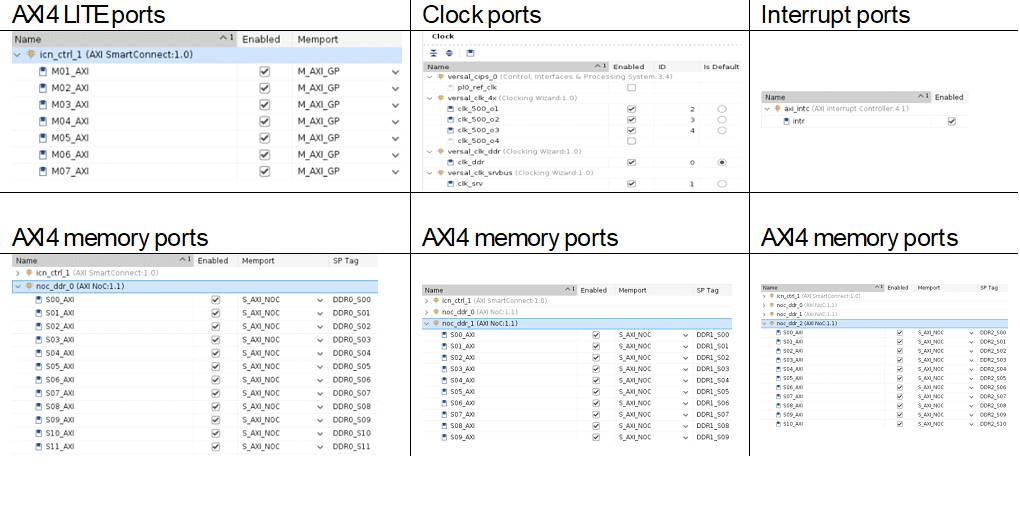
vek280/folder builds the Vivado design and sets the properties to define it as an extensible flat design platform. It also defines the Vitis platform clocks, interrupts, AXI4 ports for register configuration, and memory access required by the Vitis kernels.
Customization of the Hardware#
The following image shows the Vivado design with Intellectual Properties (IPs) enabled for platform interfaces such as Clocks, Interrupts, and AXI4 ports.
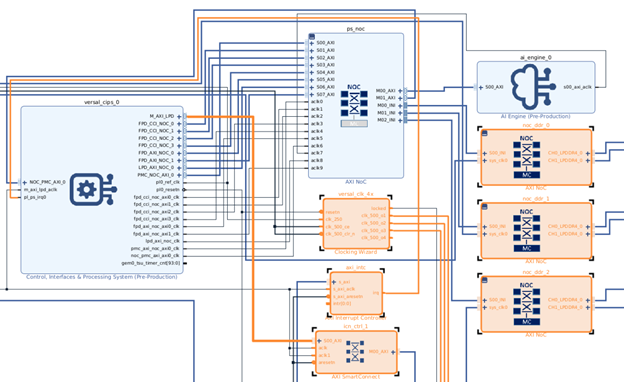
The following image shows the enabled platform interfaces that you can modify to extend them for more interfaces or custom user clocks or a greater number of DDR memory ports. This can be done by:
Opening the Vivado project
*.xprfile under the hardware folder.Opening the block design.
Going to the Platform Setup tab and making the required changes.
Using the
write_bd_tclcommand from the TCL console to generate the updated block design TCL file and incorporate the differences into thehw/pfm_bd.tcl.
Customization of the Software#
The Makefile under the vek280/create_pfm_hw.sh folder uses Yocto EDF flow. It configures the project using the XSA (Xilinx Software Archive) file generated by the Vivado design, customizes the software recipes using the vek280/create_pfm_sw.sh script to apply software patches and enable root file system packages needed, and finally builds it to create the required software components such as U-Boot, PMU firmware, Linux kernel image, and root file system to boot on the VEK280 target board.
This script also builds the Software Development Kit (SDK) and the SDK installer script (sdk.sh). You can install this script on the host machine and use it as a sysroot for application development on the host machine to cross-compile them to run on the target.
The software build also includes compiling the Neural Processing Unit software stack, VART X and Machine Learning libraries, and VVAS core libraries, which are core components of the VART X libraries. These libraries are used to access the hardware accelerators such as pre-processing, inferencing, and post-processing. It also builds the X+ML C example application, which is used as a reference to help you understand how to execute the complete reference design using the hardware accelerator kernels.
In summary, you can use the vek280/create_pfm_sw.sh script to modify the software package requirements to be built using Yocto EDF.
Note
Cross-compiling these applications directly on the target is not supported in the current release.
Customization of the X+ML Reference Vitis Application#
Once the Vitis platform is built, the next step is to build the Vitis applications as per your needs. In the X+ML reference design, an example is provided to build an application using pre-processing, inferencing, and post-processing Vitis kernels. Understanding the application workspace located at the Vitis-AI/examples/reference_design/vek280/vitis_prj folder helps you add your own custom kernels.
There are different variants of Neural Processing Unit inferencing kernels supported in this release for VEK280. You can choose one of these kernel variants while building the X+ML reference design. This can be done by running the source npu_ip/settings.sh <required IP version as an argument/type LIST to see the available NPU kernel options> command.
Details of the Vitis Application Project Directory:#
kernels: This folder contains the pre-compiled Vitis kernels.
Pre-processing Programmable Logic High-Level Synthesis (HLS) kernel (
kernels/image_processing/image_processing.xo).Inferencing Programmable Logic + AI Engine Neural Processing Unit kernel (
kernels/npu_vss). The NPU kernel is packaged as a Vitis subsystem (VSS) instead of using separate PL and AIE kernels.
link: This folder contains Vitis linker-related files or configurations.
constraints: Post-link TCL scripts invoked for performance NPU kernels. These scripts help with timing closure of the Vitis designs in case the design does not meet timing when you add more Vitis kernels. This is done by reducing the NPU kernel clocks by re-configuring the MMCMs.
package: This folder contains Vitis package step configurations.
Conclusion: Understanding the Vitis application workspace components and referring to the Vitis-AI/versal_ve/reference_design/vek280/vitis_prj/Makefile can enable a developer to add any of the existing NPU kernel accelerators and include your own pre-processing or post-processing hardware accelerators.
NPU IP and System Integration Details#
Currently, AMD NPU IPs are not included in the standard Vivado |trade| IP catalog. Instead, the NPU IP is provided within a reference design. You can use this reference design as a starting point and modify it to meet your specific needs. These reference designs are fully functional and serve as templates for IP integration, connectivity, and Linux integration.
Additionally, the NPU IP is available as a separate download, allowing developers to incorporate it into new or existing designs.
Versal AI Edge Series#
The NPU is a high-performance, general-purpose inference IP optimized for AMD Versal™ Adaptive SoC devices containing AIE-ML tiles.
Version and Compatibility#
It is essential to understand that the designs and IP in the table below were verified with specific versions of Vivado, Vitis, and Vitis AI. Please refer to Version Compatibility for additional information.
The following table associates currently available NPU IP with the supported target, and provides links to download the reference design and documentation.
IP and Reference Designs#
Item |
Target Platforms |
Vitis AI Release |
Reference Design |
|---|---|---|---|
NPU |
VEK280/VE2802 |
6.3 |
Clone the Vitis AI sources |
Integrating the NPU#
A custom Vitis platform is constructed using Vivado and Yocto EDF tools. This platform facilitates the integration of configurable hardware accelerators, such as preprocessing, ML, and post-processing, with the use of Vitis tools.
The Vitis AI toolchain, provided as a Docker container on the host machine, is employed to generate ML models, also referred to as snapshots. This process involves taking pre-trained floating-point models, quantizing them with the AI Quantizer, and compiling them with the AI Compiler.
You can then develop executable software to run on the constructed hardware. These applications, which can be written in C++ or Python, utilize the Vitis AI Runtime to load and execute the compiled models on the hardware.
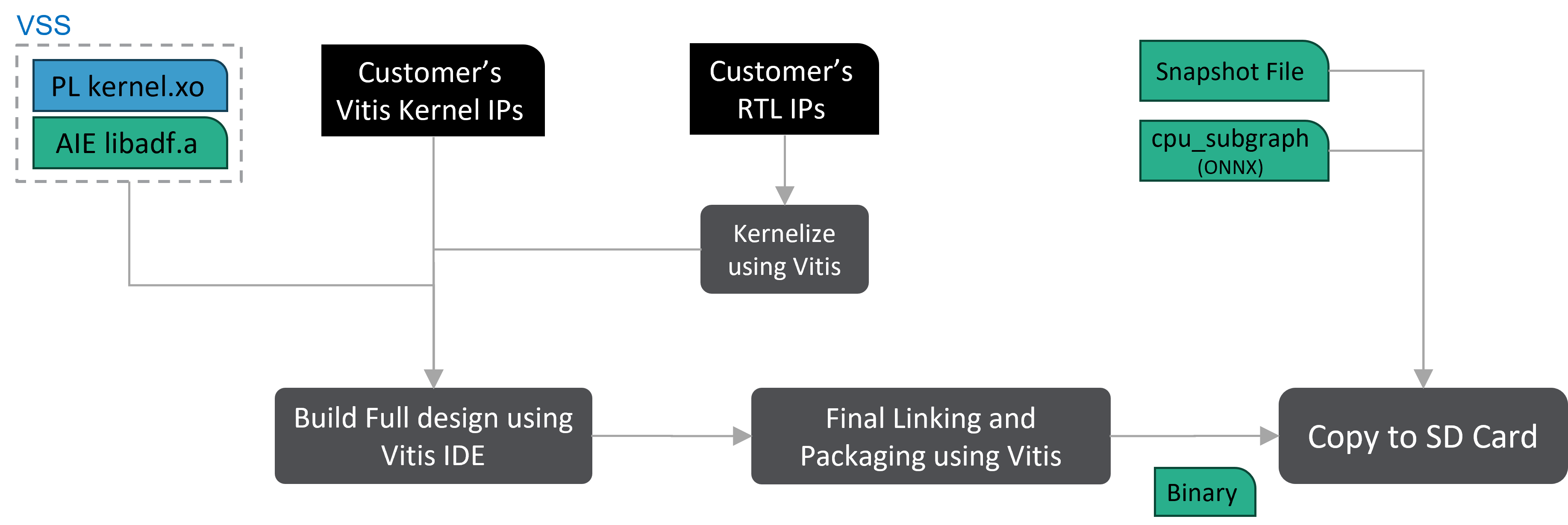
The AMD Vitis™ workflow is designed for developers who prefer a software-centric approach to AMD SoC system development. It stands apart from traditional FPGA workflows by allowing the incorporation of FPGA acceleration into applications without the need to develop RTL kernels.
The Vitis workflow facilitates the integration of the Vitis AI NPU IP as an acceleration kernel, which is loaded at runtime in the form of a PDI file. In a similar manner, the preprocessing/post-processing acceleration kernel is integrated into the platform. For more information, please refer to the VEK280 X+ML reference design included in this release.
Vitis AI Linux Recipes#
Yocto users will require bitbake recipes for the Vitis AI components that are compiled for the target. These recipes are provided in the tar package:
tree -L 1 <path_to_Vitis-AI>/versal_ve/reference_design/vek280/sw/yocto/meta-vitis-ai/recipes-vitis-ai/vartml-sw/
.
├── vartml-sw.bb
└── vartml-sw.bbappend
The packages requested by vartml-sw.bb and vartml-sw.bbappend are located at:
tree -L 1 <path_to_Vitis-AI>/versal_ve/src/vart_ml
versal_ve/src/vart_ml
|── demo
|── io
|── lib
|── LICENSE
|── Makefile
|── npu_runner
|── onnx_runner
|── README.md
|── settings.sh
|── third_party
|── update_vai.sh
|── utils
|── vai.sh
|── vart_ml_py_api
|── vart_ml_runner
|── vartml-sw.pc.in
|── vart_ml_tools
|── xrt.ini
The following are the two ways to integrate the NPU IP software stack with custom design:
Build the Linux image using Yocto EDF flow, incorporating the necessary recipes.
Cross-compile the NPU software stack on the host using the SDK script generated by Yocto EDF and then copy it to the target.
Linux Devicetree Bindings#
Note
This feature is not supported in the EA release and will be available for the public release.
When using the Yocto EDF flow, the Linux Devicetree nodes for the NPU are automatically generated. If modifications are made to the NPU IP parameters in the hardware design, changes to the .xsa must be propagated to Yocto EDF in order to ensure that the corresponding changes to the Devicetree bindings are propagated to the software platform.
Kernels#
The Vitis AI Reference Design, also known as the X+ML Reference Design, consists of both hardware and software components. The following diagram depicts the detailed flow of how X+ML solution binaries (both hardware and software) are generated to be run on the VEK280 board.
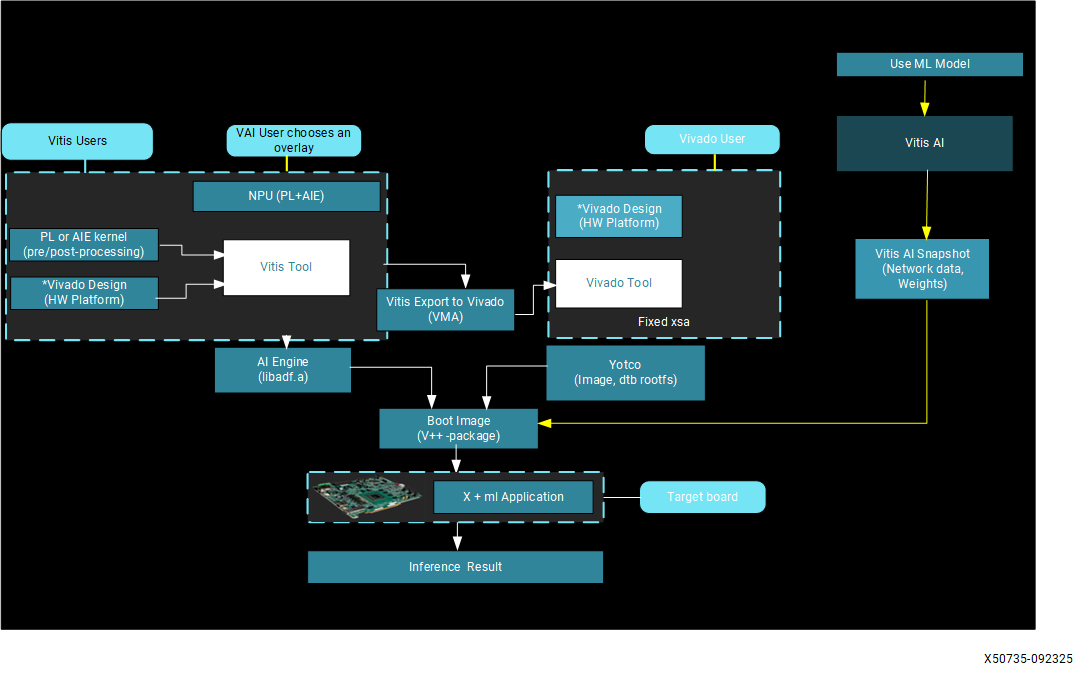
Hardware binaries are generated by the Vitis tool by linking pre-processing, Neural Processing Unit, and post-processing kernels with the Vitis platform to output the BOOT.BIN and xclbin files.
Software binaries are generated by compiling the VART X and Machine Learning APIs, as well as the X+ML application, as part of the Yocto EDF build during platform generation. The Yocto EDF build generates the root file system and the Linux kernel image.
Both hardware and software components are packaged into the VE2802_NPU_IP_O00_A304_M3.wic file, which is generated by the Vitis packaging tool.
For any neural network that you want to accelerate on an FPGA device, the Neural Processing Unit stack generates the snapshot file on the x86 host machine using the provided Docker. The snapshot file contains the structure of the neural network, its weights, calibration results, fine-tuning execution, and input sizes, including batch size.
With the snapshot as input, hardware binaries are flashed onto the FPGA, and the X+ML application is executed using the compiled VART X and Machine Learning APIs.
A Neural Network Processor Unit (Neural Processing Unit) is a machine learning processor that provides a comprehensive solution for deploying AI models on FPGAs/Adaptive SoCs, offering significant performance improvements and power efficiency compared to traditional CPU and GPU-based solutions. It is released with the Vitis AI specialized instruction set, allowing efficient implementation of many deep learning networks. You can keep your neural network, continue to train it in the same way, and easily transition to compute it on Adaptive SoCs.
NPU Kernel Features#
Compatible with various deep learning frameworks such as TensorFlow, PyTorch, and ONNX.
Uses both Programmable Logic (PL) and AI Engine (AIE) resources of the Adaptive SoC device.
Implemented on the VE2802 (VEK280) using 38/24/16 AIE columns;
Supports the INT8/BF16 data format.
Supports several 2D operators.
Kernel core is “free” licensed.
Provides broad model coverage (~2,000 models).
NPU Kernel Interfaces#
This section explains the Neural Processing Unit kernel interfaces that are utilized as a Vitis kernel with the VEK280 platform. The NPU kernel consists of both PL and AIE logic. This kernel works as an inference hardware accelerator in the X+ML Reference Design. With the aid of pre-processing and post-processing kernels, it can efficiently build a full pipeline for inference applications.
NPU Kernel#
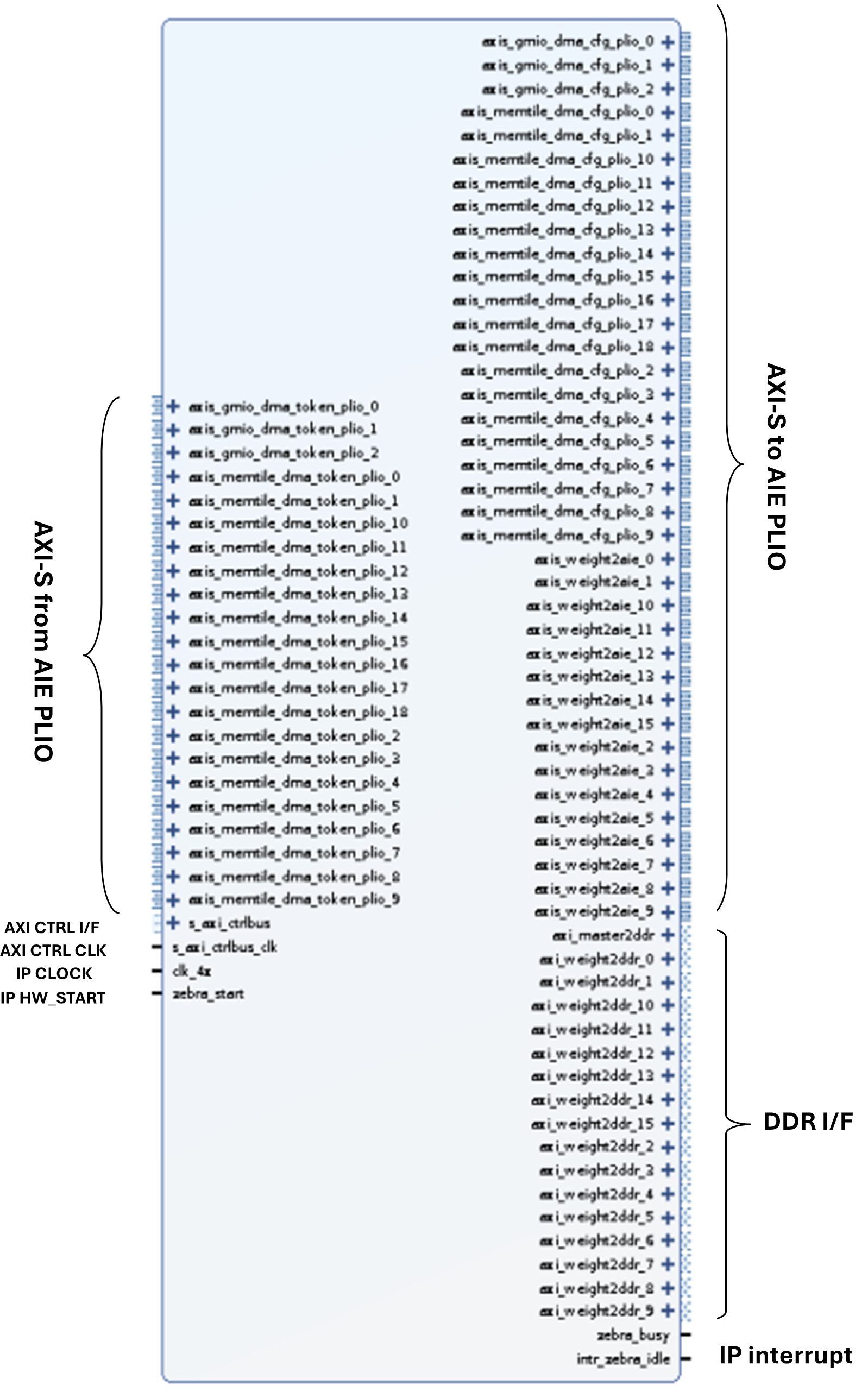
The following diagram shows the Programmable Logic (PL) for the Performance version of the NPU kernel that uses all 304 tiles (all 38 columns) of the VE2802 device. The number of interfaces shown in the figure might vary based on the performance version you have chosen, for example, 16-column and 24-column.
NPU Kernel Clocking#
The number of clock requirements for the Neural Processing Unit kernel varies based on which type of NPU kernel you have chosen:
CLK_4x: NPU-IP core high-performance clock (at 450 MHz). The AIE part of the NPU IP is clocked at 1250 MHz.
CLK_2x: NPU-IP core medium-performance clock, at 50% of CLK_4x frequency.
CLK_1x: NPU-IP core low-performance clock, at 25% of CLK_4x frequency.
CLK_DDR: Used for data bridging to NoC access points. It is assumed that all DDR NoCs are aligned to the same CLK_DDR frequency.
S_AXI_CTRLBUS_CLK: NPU-IP slave control interface clock
NPU Kernel Address Mapping#
The following Vivado IP Integrator address editor snippet on the VEK280 platform shows how the Neural Processing Unit kernel accesses three DDR controllers and is mapped to the APU for register configuration. The following diagram highlights the address mapping of the NPU kernel DDR interface and register interface ports.
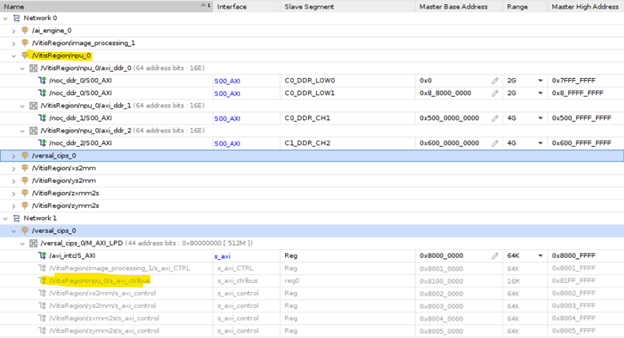
NPU Kernel Resource Utilization#
The Neural Processing Unit kernel is implemented using both PL and AIE hardware on the VE2802 Versal Adaptive SoC device that is present on the VEK280 board. The following table summarizes the resource utilization of the NPU kernel when performing inferencing. The 3 columns labeled A128, A192 and A304 denote the number of AIE tiles for the Performance IP.
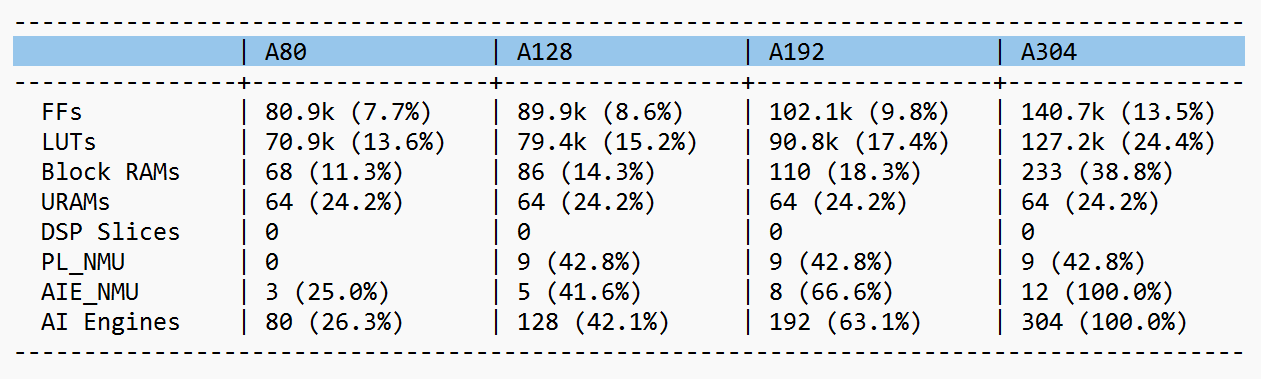
Pre-processing in machine learning is a crucial step that involves preparing and transforming data into a suitable format given as input to the machine learning models.
Examples of pre-processing tasks include resizing, color space conversion, mean subtraction, and normalization. Although these operations can be achieved in software, the performance benefit is substantial when accelerated in hardware. We use a Vitis High-Level Synthesis (HLS) kernel named “Image Processing” that can be implemented in the Programmable Logic (PL) region of the Versal Adaptive SoC for pre-processing.
Features of the Pre-processing Kernel#
Memory-mapped AXI4 interface
Supports spatial resolutions from 64 × 64 up to 3840 × 2160
Converts input color images of one size to output color images of a different size
Can process two pixels per clock
The pre-processing PL IP is clocked at 325 MHz.
Supports RGB8, BGR8, RGBX8, BGRX8, NV12, and YUV420 formats
Supports 8-bit color components per pixel on the memory interface
Dynamically configurable source and destination buffer addresses
Supports bilinear interpolation for resizing
Supports 64-bit DDR memory address access
Supports interrupts to notify the APU upon kernel completion
Pre-processing Kernel Block Diagram#
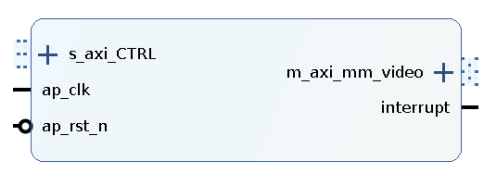
Address Mapping of the Pre-processing Kernel#
The Vitis tool links the pre-processing kernel to the pre-defined Vitis platform. Upon linking, the kernel interfaces are automatically connected to the corresponding IPs. The AXI4-Lite interface of the pre-processing kernel allows you to dynamically control parameters within the core. These kernel registers can be configured through the AXI4-Lite interface by using VART X pre-processing APIs running on the APU.
The following diagram shows the address mapping of the pre-processing PL kernel in the X+ML Reference Design.
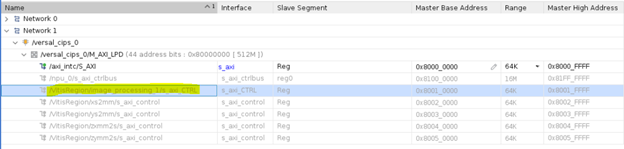
Pre-processing Resource Utilization#
Pre-processing is implemented using PL hardware on the VE2802 Versal Adaptive SoC device that is present on the VEK280 board. The following table summarizes the resource utilization numbers of this kernel.
Resource |
Quantity |
Utilization |
|---|---|---|
LUT |
27,075 |
6.45 % |
FF |
39,071 |
4.30% |
BRAM |
19 |
5.18% |
URAM |
2 |
1.0% |
DSP |
72 |
5.49% |
Resource Utilization#
Refer the following table for system resource utilization of Vitis AI reference design.
