Asynchronous Inference Execution#
Overview#
This guide covers asynchronous multi-frame inference on Versal AI Edge Series Gen 2 using the VART-ML vart::Runner APIs. It describes how synchronous and asynchronous execution differ and when to use each, then walks through the vart_infer_async reference application — a C++ sample that demonstrates pipelined async inference.
Note
Complete Run Your First Inference before this chapter. Review synchronous Runner::execute usage in VART Application Development before proceeding.
Synchronous and Asynchronous Inference#
vart::Runner supports both synchronous and asynchronous inference execution (see VART ML APIs).
An NPU compute unit is:
a 4×4 block of 16 AI Engine tiles on Versal AI Edge Series Gen 2. When the AMD Vitis™ AI compiler compiles a model, each partition is placed on one or more of these blocks.
Synchronous inference — Runner::execute runs one batch on the NPU compute units and blocks the calling thread until that batch completes. This is the simplest path for single-frame debug or single-shot inference.
Asynchronous inference — Runner::execute_async submits a batch and returns immediately with a JobHandle (see VART ML APIs). The host can stage the next batch or perform other work while the NPU compute units run. Completion is reported by:
Polling — call
Runner::wait(job_handle, timeout)on the submitted handle. A return value ofStatusCode::JOB_PENDINGmeans the job is still running; poll again or use a longer timeout.Callback — pass an
ExecuteAsyncCallback(see VART Application Development) to theexecute_asyncoverload; the runtime invokes it on an internal worker thread when that job finishes.
For new applications, start with polling (wait). Use callbacks when you want the runtime to notify your code on a worker thread instead of polling handles.
Several jobs can be in flight at once—each with its own input and output tensor buffers. While the NPU runs one batch, the CPU can queue the next; as each job finishes, the CPU collects the result without waiting for all jobs to complete.
To keep the NPU compute units busy, applications typically maintain multiple in-flight jobs, each with its own input/output buffer set. Submit the next batch while earlier batches still execute; when the runner reports StatusCode::RESOURCE_UNAVAILABLE, all internal execution slots are busy—retry after a job completes.
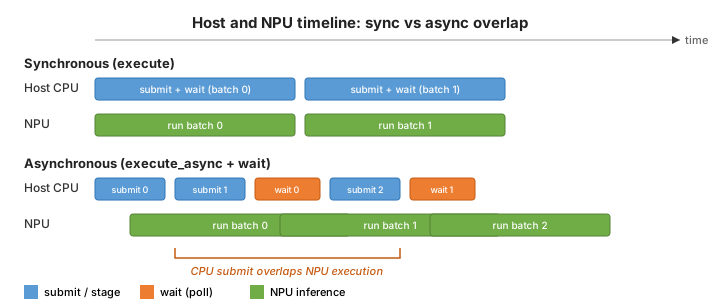
Host and NPU activity over time. With execute, the CPU blocks during each run on the NPU compute units. With execute_async, the host can submit the next batch while earlier batches still run on the NPU compute units.#
Note
Use execute_async when you need to submit the next batch before the previous one completes—for example, when inputs arrive from a stream or queue. Use execute when you need the simplest single-batch path or are debugging one frame at a time.
Demonstration Example: vart_infer_async#
The vart_infer_async sample demonstrates async pipelined inference. Key constraints:
One batch loaded: Reads a single IFM batch from
--input-binary, or fills random data with--dry-run.Repeated submissions: Issues
--num-iterationexecute_asynccalls on that same in-memory batch — reading new frames from disk on each submission is left to the application.Polling only: Uses the
execute_async+Runner::waitpath. For the callback-based overload and code examples, see VART Application Development.
See the sample source and sample README for build steps and the full command-line reference.
Note
The sample supports models with only one input tensor.
First-run checklist#
Use this sequence for your first end-to-end run:
Prerequisites — Finish Run Your First Inference (board programmed, runtime environment working).
Build — Cross-compile
vart_infer_asyncon the host; see Build Applications in Reference Applications and the sample README.Deploy — Copy the binary and a VAIML-compiled model (
.raifile or cache directory) to the board. SetLD_LIBRARY_PATHas described in the sample README.Run — Start with
--dry-run(below) or supply--input-binaryonce you have a raw IFM file.Verify — Exit code 0 and a
Batches completed: <count> / <count>line in the log, where<count>matches--num-iteration.
Quick start (dry-run)#
Run these commands on the board after you deploy the binary and model (checklist step 3).
If the board is set up and a demo model is installed (as in the quick start guide), verify async inference with no IFM file:
vart_infer_async --model-path /etc/vai/models/resnet50_int8/resnet50_int8.rai --dry-run -n 20
-n 20 means 20 repeated async submissions on the same in-memory batch—not 20 different frames from a file.
Expect exit code 0 and a line similar to Batches completed: 20 / 20.
Sample output#
Dry-run or normal async run — exit code 0 and a summary line:
Batches completed: 20 / 20
Run with –input-binary (without --dry-run or --benchmark) — the sample writes OFM files (output_f*_*.bin) for the last completed submission. See the sample README for naming and layout.
Run with –benchmark — after the async pass, the log prints wall-clock timing for both paths, for example:
[INFO] async infer pass: 123.456 ms (12.346 ms/frame)
[INFO] sync infer pass: 234.567 ms (23.457 ms/frame)
Lower total time on the async line indicates overlap between submission and NPU execution. Exact values depend on model, batch size, and board load.
Run with an input binary#
After a successful dry-run, run with a compiled model and a raw IFM file:
vart_infer_async \
  --model-path /path/to/resnet50_int8.rai \
  --input-binary /path/to/ifm.bin
--input-binary supplies a raw IFM (input feature map) binary — a headerless byte stream in the compiled model’s HW tensor layout (TensorType::HW, see VART Application Development).
Creating an IFM binary: Export preprocessed input from your application pipeline in that HW layout and save it as a raw .bin file. For row size, batch layout, and example assets, see the sample README. For your first run, use --dry-run instead of preparing a file.
Command-line options#
Option |
Required |
Default |
Description |
|---|---|---|---|
|
Yes |
Path to a VAIML |
|
|
Yes* |
Path to a raw IFM binary in the compiled model’s HW layout (see Run with an input binary above). Not used with |
|
|
No |
|
Number of |
|
No |
Random IFM fill; skips file I/O and OFM writes. |
|
|
No |
Runs an additional synchronous |
|
|
No |
Print help and exit. |
* --input-binary is not required when --dry-run is set.
Benchmark async vs sync execution#
vart_infer_async \
  --model-path /path/to/model.rai \
  --input-binary /path/to/ifm.bin \
  --benchmark -n 100
Run on the board. --benchmark adds a synchronous execute pass on the same loaded batch. Compare the [INFO] async infer pass and [INFO] sync infer pass lines in the log — see Sample output for the expected format and how to interpret the results.
What the sample does#
At a high level, the application uses these VART-ML APIs:
Runner and tensors — Creates a
vart::Runnerfrom the compiled model (viavart::RunnerFactory, see VART ML APIs) and preallocates HWvart::NpuTensor(see VART Application Development) input/output buffers for each concurrent job slot.Load input once — Reads one IFM (input feature map) batch from
--input-binary(or fills random data with--dry-run) and copies it into the input tensors.Submit and wait — Queues each inference with
Runner::execute_async, which returns aJobHandleimmediately. The application then callsRunner::waiton each handle to collect results. By default, two jobs stay in flight (kNumConcurrentJobsin source; not configurable from the CLI): while the NPU runs one batch, the CPU can submit the next.Replay the same input —
--num-iterationsets how manyexecute_asynccalls run on that same loaded batch. The sample does not read new input from disk on each call.Optional sync comparison — With
--benchmark, the sample also callsRunner::executeon the same data.
The pipeline has three phases:
Prime — Submit
Runner::execute_asyncuntil all job slots are full (default: 2).Steady state — For each remaining submission, call
Runner::waitto complete the oldest job, thenRunner::execute_asyncon the freed slot.Drain — Call
Runner::waituntil every in-flight job completes (no new submissions).
Populate input data in all buffer slots
                |
                v
[1. Prime]  Runner::execute_async (fill all job slots)
                |
                v
+------- [2. Steady state] ------------------+
|                |                           |
|                v                           |
|        Runner::wait (oldest job)           |
|                |                           |
|                v                           |
|   Runner::execute_async (if submissions    |
|    remain for --num-iteration)             |
|                |                           |
+----------------+                           |
                |  (all submissions issued)
                v
[3. Drain]  Runner::wait (until queue empty)
                |
                v
              done