VART Application Development#
Navigation: ← VART X Architecture Overview · Reference Applications →
Overview#
This guide walks through building an end-to-end video analytics pipeline using VART-ML and VART-X APIs. It covers each pipeline stage — device initialization, preprocessing, inference (via ONNX Runtime or VART Runner), post-processing, and overlay visualization — and explains how to initialize, connect, and run VART components in a C++ application.
Note
Prerequisites — Before this guide, complete:
Vitis AI Runtime (VART) Overview — how VART-ML and VART-X connect and suggested reading order.
Introduction: VART X and VART ML — choosing between ONNX Runtime + Vitis AI EP and VART-ML.
VART ML Architecture Overview — VART-ML Runner, tensors, and overall architecture.
VART X Architecture Overview — VART-X modules and data flow.
For VART API signatures and parameters, see VART X APIs and VART ML APIs.
A typical pipeline acquires input frames, preprocesses them, runs inference on the NPU, postprocesses the results, and overlays predictions on the output frame.
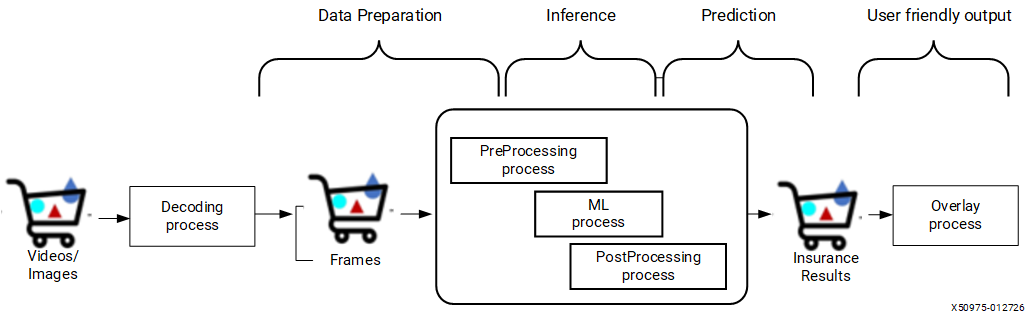
Example source code is in the Vitis AI repository under Vitis-AI/versal_2ve/examples/cpp_examples (cpp_examples). See Reference Applications for the application list, build steps, and README links.
This guide uses x_plus_ml_ort (ONNX Runtime inference) and x_plus_ml_vart (VART-ML Runner inference) as implementation examples. Both use VART-X for preprocessing, postprocessing, and overlay, and differ only in the inference runner. Both support single-level inference.
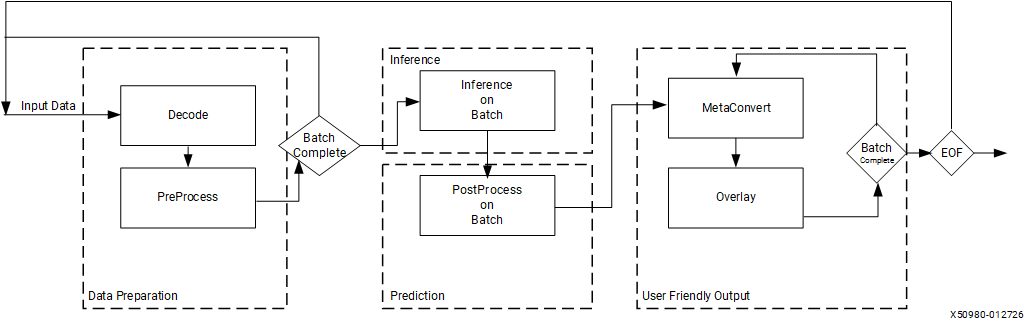
A typical application follows this structure regardless of the inference runner:
Initialization — Create and configure VART-X module instances and the inference runner (ONNX Runtime or VART Runner).
Main loop — Decode the input image, preprocess it, run inference, postprocess output tensors, and draw predictions on the frame.
Cleanup
Initialization#
Initialization creates instances of VART components — device management, preprocessing, inference, postprocessing, and overlay — and configures each with the parameters required by the pipeline. The following sections describe the initialization requirements for each component. For a complete initialization example, see the x_plus_ml_vart application.
Device#
#include <vart/vart_device.hpp>
Each VART-X module requires a device handle. VART module APIs take a device handle (vart::Device) as a required parameter. Create or get a device handle by using the following API:
static std::shared_ptr<Device> vart::Device::get_device_hdl(const int32_t dev_idx, const std::string& xclbin_loc)
This function requires two parameters:
dev_idx: Specifies the index of the device on which the VART component needs to operate.
xclbin_loc: Indicates the location of the xclbin file. The xclbin file name is mandatory for modules utilizing hardware accelerators.
VideoFrame#
#include <vart/vart_videoframe.hpp>
vart::VideoFrame holds frame data and carries it through the pipeline between VART modules. It supports four construction modes depending on how memory is managed:
Allocate new memory: Pass
VideoFrameImplType, size, memory bank index,VideoInfo, and device. UseVideoFrameImplType::XRTfor hardware-accelerated modules (physically contiguous memory) orVideoFrameImplType::NON_CMAfor standard allocation.Wrap a DMA-BUF file descriptor: Pass a DMA-BUF fd representing a CMA-backed buffer.
Wrap existing XRT buffer objects: Pass a
std::vector<xrt::bo*>of pre-allocated BOs.Wrap existing data pointers: Pass a
std::vector<uint8_t*>of caller-allocated buffers (non-XRT).
All constructors require a VideoInfo (frame dimensions, padding, alignment) and a std::shared_ptr<Device>. The VideoInfo is typically obtained from the vart::PreProcess module to match its alignment requirements.
Tip
For most pipeline use cases, the first constructor with VideoFrameImplType::XRT is recommended.
See the VART-X API reference for the complete constructor signatures and parameter details.
PreProcess#
#include <vart/vart_preprocess.hpp>
vart::PreProcess handles resize, color conversion, normalization, and quantization of input frame data to prepare it for inference. Create a PreProcess instance using:
vart::PreProcess(PreProcessImplType type, std::string& json_data, std::shared_ptr<Device> device)
The parameters for this API are as follows:
PreProcessImplType: This release provides two preprocessing implementations: hardware‑accelerated preprocessing and software‑based preprocessing. This parameter selects the VART‑provided preprocessing module to use. For example,
vart::PreProcessImplType::IMAGE_PROCESSING_HLSselects the hardware-accelerated image processing IP.json_data: Use this parameter to pass the additional preprocessing related configuration information. This information is in JSON format.
device: Handle to the device that this module uses.
Additionally, set_preprocess_info method allows setting the initial requirements of vart::PreProcess.
vart::PreProcess::set_preprocess_info(PreProcessInfo& preprocess_info)
The vart::PreProcessInfo structure contains model-specific parameters such as quantization factor, mean/scale values, output dimensions, colour format, and preprocess type (DEFAULT or LETTERBOX). See the VART-X API reference for the complete field list. To align preprocess output with the NPU input tensor, use the NPU Format Selection Guide and Mapping between Tensor Layout and Colour Format below.
These parameters control how the pre-process module prepares each image/frame for inference. The preprocess_type field selects between aspect-ratio-preserving letterbox mode and direct resize (default). When letterbox is selected, symmetric_padding centers the image within the output dimensions.
Use vart::PreProcess::get_input_vinfo() and vart::PreProcess::get_output_vinfo() to obtain the VideoInfo needed when creating input and output VideoFrame objects. See Frame Acquisition for usage details.
Inference#
This document covers two inference options: ONNX Runtime and VART Runner. Choose ONNX Runtime for standard ONNX integration with runtime CPU/NPU partitioning, or VART Runner for direct hardware control, zero-copy performance, and models compiled for fully offloaded or CPU-partition execution. For a detailed comparison, see Introduction: VART X and VART ML.
Creating Session using ONNXRT#
Create an Ort::Session with the AMD Vitis™ AI Execution Provider during pipeline initialization. For environment setup, EP configuration, session creation, and retrieving input/output tensor names, see Example: Inference Workflow with Vitis AI in ONNX Runtime C++ APIs.
Creating VART Runner (VART-ML)#
#include <vart/vart_runner_factory.hpp>
This header provides the vart::Runner, vart::RunnerFactory, vart::NpuTensor, and all related types (NpuTensorInfo, StatusCode, JobHandle, MemoryType, etc.).
Create a vart::Runner instance using:
static std::shared_ptr<vart::Runner> vart::RunnerFactory::create_runner(
    vart::RunnerType runner_type,
    const std::string& model_path,
    const std::unordered_map<std::string, std::any>& options = {});
Parameter
runner_typespecifies the runner to use. For the Vitis AI compiler runner, passvart::RunnerType::VAIML.Parameter
model_pathis the path to the Vitis AI compiled model.Parameter
optionsspecifies device or platform options.
See the VART-ML API reference for the full list of supported runners and options per platform.
The most commonly used runner options are:
"input_tensor_type"/"output_tensor_type": Set to"HW"(default) for zero-copy hardware-native format, or"CPU"for ONNX-compatible format with automatic conversion."log_level": Logging verbosity ("ERROR","WARNING","INFO","DEBUG"). Default:"INFO"."config_json": Path to the Vitis AI configuration file (vitis_ai_config.json), same configuration file used during model compilation.
The following API returns tensor metadata for the loaded model:
const std::vector<vart::NpuTensorInfo>& vart::Runner::get_tensors_info(
  vart::TensorDirection direction,
  vart::TensorType type) const;
Parameter
direction: tensor direction input or outputParameter
type: Tensor Type: Hardware (AI Engine format) or CPU (model format).HW tensor type: Memory layout and data type required by the AI engine, which might differ from the model (CPU).
This method returns vart::NpuTensorInfo, which contains tensor metadata including name, data type, direction, tensor type (CPU/HW), memory layout, shape, size, and strides. See the VART-ML API reference for the complete field list.
The following API returns the quantization parameters for a specific tensor:
const vart::QuantParameters& vart::Runner::get_quant_parameters(
    const std::string& tensor_name) const;
Parameter
tensor_name: Name of the tensor for which to retrieve quantization parameters.
The following APIs provide basic information about the model:
size_t vart::Runner::get_num_input_tensors() const;
size_t vart::Runner::get_num_output_tensors() const;
size_t vart::Runner::get_batch_size() const;
get_num_input_tensors(): Returns the number of input tensors required by the model.get_num_output_tensors(): Returns the number of output tensors produced by the model.get_batch_size(): Returns the device batch size, which determines the maximum outer vector size accepted byexecute()andexecute_async().
For implementation, see the x_plus_ml_vart application.
See also
See RunnerType::VAIML (Versal AI Edge Series Gen 2) for the complete RunnerType::VAIML options table (async configuration, NPU resource control, profiling, etc.) and the full list of supported memory layouts and data types.
Post-processing#
#include <vart/vart_postprocess.hpp>
The post-processing module performs additional operations on output tensor data from inference and produces user-understandable predicted results. It supports both model-specific (legacy) and function-specific (modular) approaches for classification, object detection, and segmentation models.
Create a post-processing instance by specifying the PostProcessType, a JSON configuration string, and the device handle:
vart::PostProcess(PostProcessType postprocess_type, std::string& json_data, std::shared_ptr<Device> device);
See also
For a complete reference of available post-processing functions, see Post Processing Functions.
For the complete
PostProcessJSON configuration reference (supported types, fields, and examples), see the PostProcess JSON Configuration Reference.
After initialization, provide model-specific tensor metadata using set_config(). The TensorInfo parameters (name, data type, scale, size, shape, direction) can be obtained from vart::Runner. See the VART-X API reference for the full parameter descriptions (including all supported PostProcessType values and JSON schemas) and the TensorInfo structure definition.
vart::PostProcess::set_config(std::vector<TensorInfo>& tensor_info, uint32_t batch_size);
For implementation details, refer to the x_plus_ml_vart and x_plus_ml_ort applications.
Meta Convert#
#include <vart/vart_metaconvert.hpp>
The Meta Convert module interprets inference results and converts them into overlay data structures (text, bounding boxes, arrows, circles, etc.) for annotating input frames with predictions.
Create an instance using:
vart::MetaConvert(InferResultType infer_res_type, std::string& json_data, std::shared_ptr<Device> device);
infer_res_type: Type of inference result. Supported values:InferResultType::CLASSIFICATION— classification network output.InferResultType::DETECTION— detection network output.InferResultType::SEGMENTATION— segmentation network output (per-pixel class maps).InferResultType::CUSTOM_RESULT_1/CUSTOM_RESULT_2/CUSTOM_RESULT_3— reserved for user-defined result types.
Pass
InferResultType::ROOTonly when constructing the dummy root node of the N-ary tree (see Building the N-ary Tree in Visualizing Model Predictions).json_data: JSON configuration controlling visualization (display levels, fonts, colors).device: Device handle.
See also
For the complete MetaConvert JSON configuration schema (parameters, defaults, and examples for display levels, fonts, colors, and class filtering), see the MetaConvert JSON Configuration Reference.
Memory#
#include <vart/vart_memory.hpp>
vart::Memory manages raw device memory buffers used in the pipeline. It is commonly used to pass inference output tensors to vart::PostProcess, but can also serve as a general-purpose buffer container for any pipeline stage.
To create a memory buffer:
vart::Memory(MemoryImplType type, size_t size, uint8_t mbank_idx, std::shared_ptr<Device> device);
MemoryImplType specifies the allocation method:
MemoryImplType::XRT: Allocates physically contiguous memory using XRT.MemoryImplType::NON_CMA: Allocates non-contiguous memory.
Additional constructors accept a user-provided data pointer, a shared_ptr<MemoryImplBase> for custom implementations, or a DMA-BUF file descriptor.
Key methods:
map(DataMapFlags): Maps device memory to user space for read or write access. Returns aconst uint8_t*pointer.unmap(): Unmaps the memory from user space.get_size(): Returns the buffer size.export_buffer(): Exports the buffer as a DMA-BUF file descriptor for inter-process sharing. Returns-1on failure.
Buffer management approaches:
Applications typically pre-allocate pools of vart::VideoFrame and vart::Memory buffers and reuse them across inference iterations. There are two common approaches for connecting these buffers to vart::Runner:
Buffer-first (pool-based): Create
vart::VideoFrameorvart::Memorypools upfront. For each buffer, construct anNpuTensoronce – export as DMA-FD and wrap withMemoryType::DMA_FDfor zero-copy, or map and wrap withMemoryType::USER_POINTER_NON_CMAfor non-zero-copy. Cache and reuse the sameNpuTensorobjects across inference iterations instead of recreating them per call (see NpuTensor Caching). This is the typical approach for video pipelines.Tensor-first: Let the Runner allocate
NpuTensorviaallocate_npu_tensor(), then after inference wrap the output tensor’s buffer in avart::Memory(using its DMA-FD or data pointer constructor) to pass tovart::PostProcess.
Both approaches are valid. See Bridging PreProcess Output to Runner Input and Bridging Runner Output to PostProcess in the Advanced Features section for code examples of each handoff.
Main Processing#
The main loop processes each frame through the following stages in order: frame acquisition, preprocessing, inference, post-processing, and visualization. The sections below describe each stage.
Per-frame call sequence:
Acquire frame — Load raw input data into a
vart::VideoFrameusing dimensions fromPreProcess::get_input_vinfo().Preprocess — Call
vart::PreProcess::process()with aPreProcessOpto resize, crop, and normalize the frame into the model’s input format.Bridge to inference — Wrap the preprocessed
VideoFramebuffer as anNpuTensor(DMA-FD for zero-copy, or mapped pointer for CPU path) or as anOrt::Valuefor ONNX Runtime.Run inference — Call
vart::Runner::execute()/execute_async()(VART Runner) orsession->Run()(ONNX Runtime). Outputs land inNpuTensor/Ort::Valueobjects.Bridge to post-process — Wrap output tensors in
vart::Memoryobjects organized into thevector<vector<shared_ptr<Memory>>>structure expected byvart::PostProcess::process().Post-process — Call
vart::PostProcess::process()to producevector<vector<shared_ptr<InferResult>>>.Build N-ary tree — Construct the root
InferResultnode and attach the post-process results as children.Convert to overlay metadata — Call
vart::MetaConvert::prepare_overlay_meta()on the root node to produceOverlayShapeInfo.Draw overlay — Call
vart::Overlay::draw_overlay()to annotate the frame.Output frame — Write the annotated frame to a file or pass it to further processing stages.
Frame Acquisition#
The first step in the main loop is to acquire input data and load it into a vart::VideoFrame. VART APIs expect raw video data in formats like BGR, RGB, RGBX, BGRX, or NV12.
Create input frames using the VideoInfo obtained from vart::PreProcess::get_input_vinfo() to ensure dimensions and alignment match the preprocessing module’s requirements:
// Get aligned VideoInfo from PreProcess
vart::VideoInfo input_vinfo;
preprocess->get_input_vinfo(height, width, vart::VideoFormat::BGR, input_vinfo);

// Create a VideoFrame with XRT-backed memory
auto input_frame = std::make_shared<vart::VideoFrame>(
    vart::VideoFrameImplType::XRT, frame_size, 0, input_vinfo, device);

// Read raw image data into the frame
auto map = input_frame->map(vart::DataMapFlags::WRITE);
std::ifstream file("input.raw", std::ios::binary);
file.read(static_cast<char*>(map.planes[0].data), map.planes[0].size);
Once the frame is populated, pass it to vart::PreProcess for preprocessing.
For a complete implementation using a VideoFramePool for efficient buffer reuse, see the x_plus_ml_vart application.
Preprocessing#
Preprocessing involves applying necessary transformations or adjustments to frame data to prepare it for input to the neural network model, ensuring that it meets the model’s requirements.
vart::PreProcess provides the API below to perform this operation:
vart::PreProcess::process(std::vector<PreProcessOp>& preprocess_ops);
Here, vart::PreProcessOp represents one pre-process operation to be performed. It has the following parameters:
in_roi(RegionOfInterest): Region of interest within the input frame.out_roi(RegionOfInterest): Corresponding region of interest within the output frame.in_frame(VideoFrame*): Pointer to the input frame.out_frame(VideoFrame*): Pointer to the output frame.
vart::PreProcess::process can perform multiple vart::PreProcessOp operations in a single call.
The input frame passed to the preprocess module through PreProcessOps must
be created using the VideoInfo obtained from:
vart::PreProcess::get_input_vinfo(int32_t height, int32_t width, VideoFormat fmt, VideoInfo& vinfo)
Similarly, the output frame must be created using the VideoInfo obtained
from:
vart::PreProcess::get_output_vinfo()
For a complete usage example of vart::PreProcess::process, see the x_plus_ml_vart and x_plus_ml_ort applications.
Once preprocessing is complete, the output vart::VideoFrame must be passed to the inference module. How the handoff works depends on the inference runner:
ONNX Runtime: Map the output VideoFrame to obtain a raw data pointer, then pass it to
Ort::Value::CreateTensor()as shown in Running Inference with ONNX Runtime.VART Runner: If the preprocessed output is already in the HW tensor format expected by the Runner, export the VideoFrame’s buffer as a DMA-FD and wrap it in an
NpuTensorfor zero-copy inference. Otherwise, map the VideoFrame and wrap the pointer as aUSER_POINTER_NON_CMAtensor withTensorType::CPU. See Bridging PreProcess Output to Runner Input in the Advanced Features section for details and code examples.
Running Inference#
Running Inference with ONNX Runtime#
Using the session created in Example: Inference Workflow with Vitis AI, prepare input and output tensors, then call session->Run():
// Create input tensor from preprocessed data
Ort::Value input_tensor = Ort::Value::CreateTensor(
    memory_info, preprocessed_data_ptr, input_element_count,
    input_shape.data(), input_shape.size());
input_tensors.emplace_back(input_tensor);

// Create output tensor (ONNX Runtime allocates memory)
Ort::Value output_tensor = Ort::Value::CreateTensor(
    allocator, output_shape.data(), output_shape.size(), output_type);
output_tensors.emplace_back(std::move(output_tensor));

// Run inference
session->Run(Ort::RunOptions{nullptr},
    input_names.data(), input_tensors.data(), num_input_tensors,
    output_names.data(), output_tensors.data(), num_output_tensors);
After execution, copy output_tensors to std::vector<std::vector<std::shared_ptr<vart::Memory>>> for post-processing. For each output tensor, create a vart::Memory object wrapping the data pointer obtained from Ort::Value::GetTensorMutableData<>(), then organize into the batch-by-tensor structure expected by vart::PostProcess::process(). See the x_plus_ml_ort application for the conversion implementation.
Running Inference with VART Runner#
Before running inference, prepare input and output tensors as vart::NpuTensor objects.
vart::NpuTensor wraps a user-allocated or runner-allocated buffer with tensor metadata. To wrap your own buffer:
vart::NpuTensor(const vart::NpuTensorInfo& info, void* buffer, vart::MemoryType mem_type);
info: Tensor metadata returned byvart::Runner::get_tensors_info().buffer: Pointer to the buffer. ForMemoryType::XRT_BO, pass a pointer to anxrt::boobject. ForMemoryType::DMA_FD, pass a pointer to the file descriptor integer. ForUSER_POINTER_CMA/USER_POINTER_NON_CMA, pass the virtual pointer directly.mem_type: Memory type of the buffer.
Ownership and lifecycle:
User-constructed tensors:
NpuTensordoes not take ownership of the buffer. The caller must keep it valid for the tensor’s lifetime.Runner-allocated tensors (via
allocate_npu_tensor): The buffer is owned by theNpuTensorand freed automatically when it goes out of scope.Sub-tensors (via
allocate_sub_tensor): Share the parent tensor’s buffer via reference counting. The underlying memory is released only after both the parent and all derived sub-tensors are destroyed.
To let the Runner allocate device-optimized memory (XRT BO):
vart::NpuTensor tensor = runner->allocate_npu_tensor(tensor_info);
For models where multiple tensors share a contiguous buffer, use allocate_sub_tensor() to create a view at a specific byte offset:
vart::NpuTensor sub = runner->allocate_sub_tensor(parent_tensor, sub_info, offset_bytes);
See the VART-ML API reference for sub-tensor requirements and memory management details.
To perform inference, call vart::Runner::execute:
StatusCode execute(const std::vector<std::vector<NpuTensor>>& inputs,
                   std::vector<std::vector<NpuTensor>>& outputs)
The execute API accepts inputs and outputs as vector<vector<NpuTensor>>, where:
The first dimension represents the batch size (up to
get_batch_size()).The second dimension represents the individual tensors for each input or output in the batch.
Batch buffers and HCWNC4#
get_batch_size() is the number of batch slots you pass to execute(), not the N dimension inside each HW tensor shape. Each slot is one NpuTensor backed by its own contiguous buffer (NpuTensorInfo::size_in_bytes is always per frame, per slot).
For HW layouts such as HCWNC4, the runner-reported shape uses ``N = 1`` in every buffer. A compiled model with device batch size 4 is therefore four separate buffers, each shaped like [H, C/4, W, 1, 4] (for example [224, 1, 224, 1, 4] for ResNet50)—not one buffer shaped [H, C/4, W, 4, 4].
VART (``Runner::execute``) — batch is the outer vector; each element is one contiguous buffer:
get_batch_size() = 4, one input tensor

inputs[0][0]  -->  NpuTensor  HW [H,1,W,1,4]   (frame 0)
inputs[1][0]  -->  NpuTensor  HW [H,1,W,1,4]   (frame 1)
inputs[2][0]  -->  NpuTensor  HW [H,1,W,1,4]   (frame 2)
inputs[3][0]  -->  NpuTensor  HW [H,1,W,1,4]   (frame 3)
                           |
                           v
                 runner->execute(inputs, outputs)
ONNX Runtime (contrast) — batch is inside the tensor shape; one Ort::Value per input holds all frames in a single contiguous CPU buffer (for example [4, 3, 224, 224] in NCHW). See the ONNX Runtime inference steps above in this guide and the ml_ort / x_plus_ml_ort reference applications.
See also
HCWNC4 layout and CPU-to-HW shape mapping: Tensor Formats. Per-frame IFM file layout for ml_vart: CPP VART Examples.
After execution, output tensors are stored in outputs.
Asynchronous Execution with vart::Runner#
Note
The reference applications run inference with synchronous execute. For sample code that uses execute_async and wait, see Asynchronous Inference and CPP VART Examples.
vart::Runner provides two asynchronous overloads of execute_async():
// Overload 1: Polling-based -- use wait() to check completion
JobHandle execute_async(const std::vector<std::vector<NpuTensor>>& inputs,
                        std::vector<std::vector<NpuTensor>>& outputs);

// Overload 2: Callback-based -- cb is invoked on completion
JobHandle execute_async(const std::vector<std::vector<NpuTensor>>& inputs,
                        std::vector<std::vector<NpuTensor>>& outputs,
                        ExecuteAsyncCallback cb);

// Wait for a polling-based job; returns JOB_PENDING if not yet complete
StatusCode wait(const JobHandle& job_handle, std::chrono::milliseconds timeout);
Both overloads return a JobHandle containing the job status and a unique ID. For the polling-based overload, call wait() to check completion. If wait() returns StatusCode::JOB_PENDING, the job is still running – call wait() again to continue polling or block with a longer timeout.
Polling-based example:
auto job = runner->execute_async(inputs, outputs);

if (job.status == StatusCode::RESOURCE_UNAVAILABLE) {
    // All execution slots busy -- retry after a short delay
} else {
    // Block until completion (or timeout)
    auto status = runner->wait(job, std::chrono::milliseconds(timeout_ms));
    // Safe to reuse tensors after wait returns
}
Callback-based example:
// ExecuteAsyncCallback = std::function<void(const JobHandle&)>
auto job = runner->execute_async(inputs, outputs,
    [](const JobHandle& handle) {
        // Job completed -- safe to reuse tensors here
        // Callback runs on an internal worker thread; ensure thread safety
    });

if (job.status == StatusCode::RESOURCE_UNAVAILABLE) {
    // All execution slots busy -- retry after a short delay
}
Key rules:
Input and output tensors must remain valid until the job completes (
wait()returns or callback fires).If
execute_asyncreturnsStatusCode::RESOURCE_UNAVAILABLE, the internal queue is full – wait briefly and retry.Callbacks run on internal worker threads. Keep callback logic lightweight and thread-safe.
For the full API surface, see: VART ML APIs
Running Post-processing#
After obtaining the inference results, the application proceeds to perform post-processing tasks on the model output data to generate understandable predicted outputs. Post-processing implementations vary — see Post Processing Functions for modular (function-specific) approaches and model-specific (legacy) approaches. You are responsible for understanding the algorithm and data alignment/placement in the inference output.
Before calling process(), the inference output must be converted to a format that vart::PostProcess accepts:
ONNX Runtime: Wrap each output tensor’s data pointer (via
Ort::Value::GetTensorMutableData<>()) in avart::Memoryobject, organized into the batch-by-tensor structure.VART Runner: Export each output
NpuTensor’s buffer as a DMA-FD and create avart::Memoryfrom it, or obtain the virtual address for rawint8_t*pointer access. See Bridging Runner Output to PostProcess in the Advanced Features section for code examples of both approaches.
VART provides a framework where you can integrate your own post-processing implementations tailored to the requirements of your models. You must ensure that the output from post-processing conforms to the vart::InferResult format to maintain compatibility with subsequent modules in the VART pipeline. For details on adding a custom post-processing implementation, see Extending VART-X Modules.
Call vart::PostProcess::process() with the converted inference output. It returns vector<vector<shared_ptr<InferResult>>>.
For implementation details, see the x_plus_ml_vart and x_plus_ml_ort applications.
Inference Result#
The output of vart::PostProcess is a vector<vector<shared_ptr<InferResult>>>, where the outer dimension is the batch and the inner dimension holds predictions per frame. Each vart::InferResult contains the processed output data ready for further use.
vart::InferResult provides a transform() API to map inference results from the model’s input resolution back to the original frame resolution. This is needed in video pipelines where the input frame resolution differs from the model’s input dimensions:
vart::InferResult::transform(InferResScaleInfo& info);
vart::InferResScaleInfo contains the following fields: model_input_width, model_input_height, input_frame_width, and input_frame_height, which are used to compute the scale factors for the conversion.
vart::InferResult::get_infer_result() returns the typed result structure for the inference. Cast the return value to the appropriate result type.
vart::InferResult supports three result data structures:
ClassificationResData: Contains labels, confidence scores, and class indices for classification results.
DetectionResData: Contains bounding box coordinates, labels, confidence scores, and class IDs for object detection results.
SegmentationResData: Contains segmentation type, output dimensions, and segmentation maps.
See the VART-X API reference for the complete field definitions of each structure.
For usage of the results, refer to the x_plus_ml_vart application.
See Extending VART-X Modules for details on adding custom InferResult types.
Visualizing Model Predictions#
In ML pipelines, it’s often useful to visualize the inference results produced by the model directly on the input frames. This involves tasks such as drawing bounding boxes around detected objects, labeling objects, or applying other visual enhancements based on the model’s predictions.
VART-X provides two modules for this: vart::MetaConvert converts vart::InferResult into an overlay data structure, and vart::Overlay draws that data onto a vart::VideoFrame.
#include <vart/vart_overlay.hpp>
Create an Overlay instance with:
vart::Overlay (OverlayImplType overlay_impl_type, std::shared_ptr<Device> device);
OverlayImplType: Specifies the overlay implementation. Currently onlyvart::OverlayImplType::OPENCV(OpenCV-based) is supported.device: Handle to the device this module uses.
Building the N-ary Tree#
vart::MetaConvert::prepare_overlay_meta() expects the root node of an N-ary tree of vart::InferResult objects. The tree structure allows MetaConvert to handle both single-stage and cascaded inference by traversing all inference levels and collecting shape information for overlay.
For single-stage inference, the root node has one level of children — one InferResult per frame in the batch. Use vart::InferResult interfaces to build the tree:
std::vector<std::shared_ptr<InferResult>> root_res;
for (uint32_t i = 0; i < batch_size; i++) {
  /* Create a dummy root node */
  root_res.push_back(std::make_shared<InferResult>(InferResultType::ROOT));
  if (inference_results.size()) {
    /* Add inference results as children */
    (root_res.back())->add_children(inference_results[i]);
  }
}
For cascaded inference, add results from each stage as children of the previous level’s results. For example, for a detection model (YOLOv2) followed by a classification model (ResNet50):
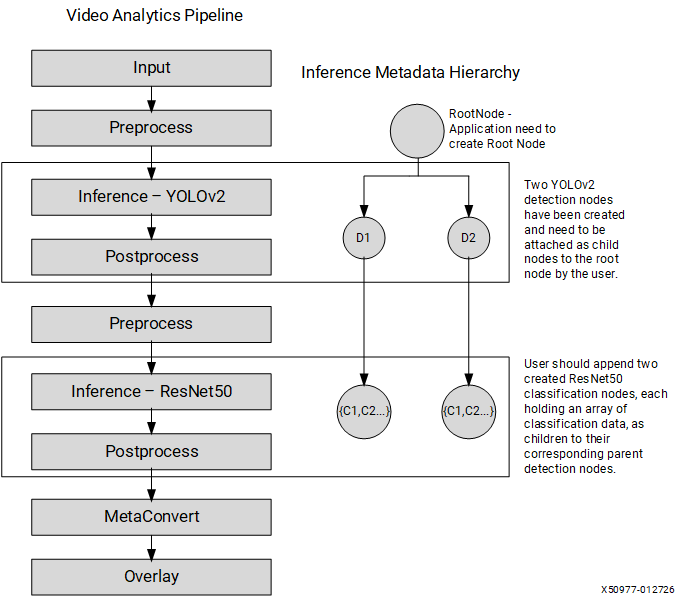
The corresponding tree structure:
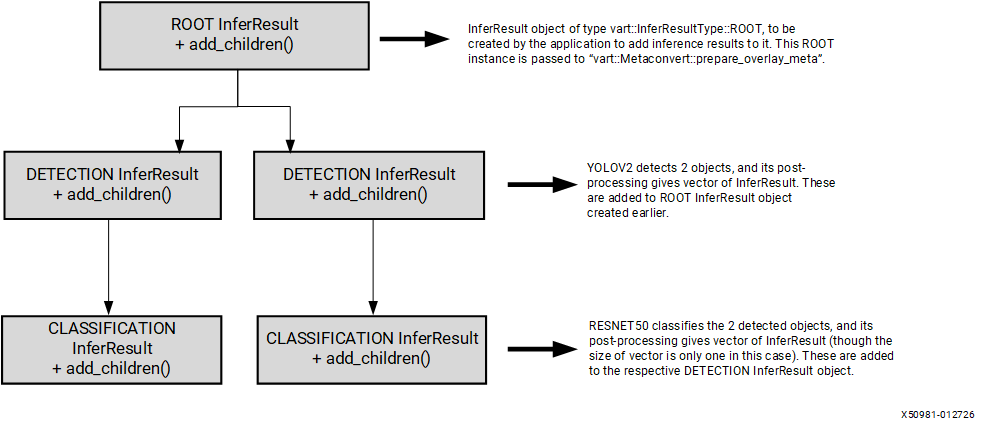
Pass the root node to vart::MetaConvert::prepare_overlay_meta() to produce the overlay metadata:
std::shared_ptr<OverlayShapeInfo> vart::MetaConvert::prepare_overlay_meta(std::shared_ptr<InferResult> root_infer_res);
This returns a vart::OverlayShapeInfo that the vart::Overlay module uses to draw on a frame:
vart::Overlay::draw_overlay(VideoFrame& frame, OverlayShapeInfo& shape_info);
For usage details, see the x_plus_ml_vart application.
After overlay, the application can write the annotated frame to a file or pass it to further processing stages as required.
Cleanup#
All VART-ML and VART-X objects (vart::Runner, vart::Device, vart::PreProcess, vart::PostProcess, vart::MetaConvert, vart::Overlay, vart::Memory, vart::VideoFrame, and vart::NpuTensor) are RAII-managed. Resources are released automatically when the objects go out of scope or their shared_ptr reference counts reach zero — no explicit close() or destroy() calls are needed.
For application-allocated resources outside VART (XRT device handles, file descriptors, OpenCV mats, etc.), release them using their own APIs before the application exits.
Building Your Application#
This section explains how to compile and link a C++ application that uses VART-ML and VART-X APIs.
Requirements#
C++17 or later (
--std=c++17)AMD SDK sysroot with VART-ML and VART-X libraries and
pkg-configfiles pre-installed
Before building, source the SDK cross-compilation environment:
source <SDK_Installation_Path>/environment-setup-cortexa72-cortexa53-amd-linux
This sets up the cross-compiler, sysroot paths, and pkg-config search paths so that VART-ML and VART-X libraries are found automatically.
Required Headers#
A typical application includes the following headers:
// VART-ML (inference)
#include <vart/vart_runner_factory.hpp>   // Runner, RunnerFactory, NpuTensor, StatusCode, JobHandle

// VART-X (pipeline modules)
#include <vart/vart_device.hpp>           // Device
#include <vart/vart_videoframe.hpp>       // VideoFrame, VideoInfo, VideoFormat
#include <vart/vart_preprocess.hpp>       // PreProcess, PreProcessInfo, PreProcessOp
#include <vart/vart_postprocess.hpp>      // PostProcess, TensorInfo, PostProcessType
#include <vart/vart_metaconvert.hpp>      // MetaConvert
#include <vart/vart_overlay.hpp>          // Overlay
#include <vart/vart_memory.hpp>           // Memory
vart/vart_runner_factory.hpp internally includes vart/vart_npu_tensor.hpp, so all tensor-related types are available through a single include.
Using pkg-config#
Both VART-ML and VART-X install pkg-config files (vart-ml.pc and vart-x.pc) that provide the correct compiler and linker flags.
To query flags manually:
pkg-config --cflags --libs vart-ml
pkg-config --cflags --libs vart-x
Sample Makefile#
Below is a minimal Makefile for cross-compiling an application that uses both VART-ML and VART-X:
# Source the SDK environment before running make:
#   source <SDK_Path>/environment-setup-cortexa72-cortexa53-amd-linux

CXX       := $(CXX)
CXXFLAGS  := --std=c++17 -O2 $(shell pkg-config --cflags vart-ml vart-x)
LDFLAGS   := $(shell pkg-config --libs vart-ml vart-x)

APP       := my_vart_app
SRCS      := main.cpp

$(APP): $(SRCS)
  $(CXX) $(CXXFLAGS) -o $@ $^ $(LDFLAGS)

clean:
  rm -f $(APP)
Build steps:
# 1. Source the cross-compilation environment
source <SDK_Path>/environment-setup-cortexa72-cortexa53-amd-linux

# 2. Build
make

# 3. The resulting binary is cross-compiled for the target platform
Advanced Features and Optimizations#
This section covers advanced features and performance optimization techniques available in VART applications, including zero-copy support, tensor caching, and custom module extensions.
Zero Copy Support#
See also
For architectural background on zero-copy concepts and design principles, see VART-ML architecture overview.
What is Zero Copy#
Zero-copy means passing data buffers directly between pipeline stages without copying data to intermediate buffers. Instead of the Runner copying input data from the application’s buffer into an internal device buffer (and copying output data back), the application allocates buffers directly on the device and the Runner uses them in-place.
This eliminates redundant memory copies and reduces inference latency and CPU overhead, which is critical for high-throughput pipelines.
Where Zero Copy is Possible#
In a typical VART pipeline, zero-copy is possible at two handoff points:
PreProcess to Runner (input side): If
vart::PreProcesswrites its output into an XRT-backedvart::VideoFramein the HW tensor format expected by the Runner, the application can wrap that buffer directly as anNpuTensorand pass it toexecute()without any data copy.Runner to PostProcess (output side): If the Runner writes inference results into device-allocated buffers (XRT BO, DMA-FD, or CMA), and
vart::PostProcesscan consume the HW tensor format directly, no copy is needed between inference and post-processing.
Zero-copy requires the application to work with HW tensor type (TensorType::HW), which uses AMD’s hardware-native data formats and memory layouts. These might differ from the ONNX model’s original format (TensorType::CPU). For example, a model with CPU format NCHW, FP32, [1,3,224,224] might have HW format HCWNC4, BF16, [224,1,224,1,4]. When using TensorType::CPU, the Runner performs format conversion internally, which involves a data copy.
The application must also use a device-accessible memory type for the tensor buffer. The following table shows which MemoryType values support zero-copy:
MemoryType |
Description |
Zero-Copy |
|---|---|---|
|
XRT Buffer Object, device-accessible CMA memory |
Yes |
|
DMA file descriptor, portable across Linux subsystems |
Yes |
|
User-provided pointer to physically contiguous (CMA) memory |
Yes |
|
Standard host memory ( |
No (data copied by Runner) |
Note
TensorType::HW with USER_POINTER_NON_CMA is not supported and throws an error at tensor construction. Use TensorType::CPU if your buffers are standard host memory.
Note
RunnerType::VAIML supports various memory layouts (NHW, NCHW, NHWC, HCWNC4, HCWNC8, GENERIC, etc.) and data types (INT8, UINT8, BF16, FP16, FLOAT32, etc.). For the complete list, see Supported Layouts and Data Types in the VART-ML architecture overview.
How to Enable Zero Copy#
To achieve zero-copy inference, buffers must be allocated directly on the device using xrt::bo, DMA-backed file descriptors (FD), or user-allocated CMA buffers. The application must prepare data in the HW tensor format and wrap the buffers as NpuTensor objects. The following steps describe the process for input and output sides.
To enable zero-copy for input and output tensors, set input_tensor_type and output_tensor_type in the runner options to "HW":
/* Runner Options */
std::unordered_map<std::string, std::any> options = {
      {"log_level", "INFO"},
      {"input_tensor_type", "HW"},
      {"output_tensor_type", "HW"}};

std::string model_path = "vai_compiled_model";

/* Create Runner */
auto runner = vart::RunnerFactory::create_runner(vart::RunnerType::VAIML, model_path, options);
Zero copy on the input side#
To achieve zero-copy on the input side, query the HW tensor metadata, allocate a device buffer, prepare data in the HW format, wrap the buffer in an NpuTensor, and pass it to the Runner:
// 1. Query HW tensor metadata
auto input_tensors_info = runner->get_tensors_info(vart::TensorDirection::INPUT, vart::TensorType::HW);

// 2. Allocate device buffer (xrt::bo, DMA-FD, or CMA)
xrt::bo* input_bo_ptr = new xrt::bo(xrt_device, input_tensors_info[0].size_in_bytes, 0);

// 3. Prepare input data in HW format (channel order, padding, data type, etc.)
//    Copy or produce HW-formatted data into the BO's mapped pointer.

// 4. Wrap buffer in NpuTensor
std::vector<std::vector<vart::NpuTensor>> inputs;
std::vector<vart::NpuTensor> input;
vart::NpuTensor input_tensor(input_tensors_info[0], input_bo_ptr, vart::MemoryType::XRT_BO);
input.push_back(std::move(input_tensor));
inputs.push_back(std::move(input));

// 5. Pass to execute (see below with output side)
Zero copy on the output side#
Similarly, query output HW metadata, allocate a device buffer, wrap it, and pass to the Runner. After execution, results are written directly to the device buffer:
// 1. Query HW tensor metadata for output
auto out_tensors_info = runner->get_tensors_info(vart::TensorDirection::OUTPUT, vart::TensorType::HW);

// 2. Allocate device buffer
xrt::bo* output_bo_ptr = new xrt::bo(xrt_device, out_tensors_info[0].size_in_bytes, 0);

// 3. Wrap buffer in NpuTensor
std::vector<std::vector<vart::NpuTensor>> outputs;
std::vector<vart::NpuTensor> output;
vart::NpuTensor output_tensor(out_tensors_info[0], output_bo_ptr, vart::MemoryType::XRT_BO);
output.push_back(std::move(output_tensor));
outputs.push_back(std::move(output));

// 4. Run inference -- results written directly to device buffer
auto ret = runner->execute(inputs, outputs);
if (vart::StatusCode::SUCCESS != ret) {
    std::cerr << "Inference failed: " << static_cast<int>(ret) << std::endl;
}
Bridging PreProcess Output to Runner Input#
When using vart::PreProcess, the preprocessed output is stored in a vart::VideoFrame. There are two ways to pass this data to vart::Runner, depending on whether the preprocessed output is already in the HW tensor format expected by the Runner.
Zero-copy path (preprocessed data is in HW format)
If vart::PreProcess produces output in the HW tensor format required by the Runner, export the VideoFrame buffer as a DMA file descriptor and wrap it in an NpuTensor with MemoryType::DMA_FD. This avoids any data copy between preprocessing and inference:
// Export the preprocessed output frame as a DMA-BUF file descriptor
int dma_fd = preprocess_out_frame.export_buffer();

// Wrap the DMA FD as an NpuTensor using the HW tensor info from Runner
auto input_tensor_info = runner->get_tensors_info(vart::TensorDirection::INPUT, vart::TensorType::HW);
vart::NpuTensor input_tensor(input_tensor_info[0], &dma_fd, vart::MemoryType::DMA_FD);
Non-zero-copy path (preprocessed data is in CPU format)
If the preprocessed output is not in the HW tensor format (for example, a standard image format), map the VideoFrame to obtain a virtual pointer and wrap it as a USER_POINTER_NON_CMA tensor with TensorType::CPU. The Runner performs the format conversion internally:
// Map the preprocessed output frame
auto map_info = preprocess_out_frame.map(vart::DataMapFlags::READ);

// Wrap the mapped pointer as an NpuTensor using CPU tensor info
auto input_tensor_info = runner->get_tensors_info(vart::TensorDirection::INPUT, vart::TensorType::CPU);
vart::NpuTensor input_tensor(input_tensor_info[0], map_info.planes[0].data, vart::MemoryType::USER_POINTER_NON_CMA);
In this case, the Runner copies and converts the data internally.
Bridging Runner Output to PostProcess#
After inference, the Runner output NpuTensor objects need to be passed to vart::PostProcess. PostProcess accepts two input formats: std::vector<int8_t*> (raw pointers) or std::vector<std::vector<std::shared_ptr<vart::Memory>>> (Memory objects organized by batch and tensor).
Using vart::Memory (recommended)
Create vart::Memory objects wrapping the output tensor buffers, then pass them to PostProcess::process(). If the output tensors use device-accessible memory (XRT BO or DMA-FD), export the buffer as a DMA-FD and create a Memory from it:
// For each batch and each output tensor, create a vart::Memory from the NpuTensor's DMA FD
std::vector<std::vector<std::shared_ptr<vart::Memory>>> tensor_memory;
for (auto& batch : output_npu_tensors) {
    std::vector<std::shared_ptr<vart::Memory>> batch_memory;
    for (auto& tensor : batch) {
        int fd = tensor.export_buffer();
        auto mem = std::make_shared<vart::Memory>(
            vart::MemoryImplType::XRT, fd, tensor.get_info().size_in_bytes, device);
        batch_memory.push_back(mem);
    }
    tensor_memory.push_back(batch_memory);
}

auto results = post_process->process(tensor_memory, batch_size);
Using raw pointers
If the output tensors use CPU-accessible memory, map or obtain the virtual address and pass raw int8_t* pointers:
std::vector<int8_t*> tensor_ptrs;
for (auto& batch : output_npu_tensors) {
    for (auto& tensor : batch) {
        tensor_ptrs.push_back(static_cast<int8_t*>(tensor.get_virtual_address()));
    }
}

auto results = post_process->process(tensor_ptrs, batch_size);
Zero Copy Pipeline Pattern#
A fully zero-copy pipeline operates on HW tensors end-to-end, eliminating data copies between stages. This requires vart::PreProcess to output data in the HW tensor format expected by vart::Runner, and vart::PostProcess to consume the Runner’s HW output format directly.
Zero-copy requires CMA-backed buffers shared between pipeline stages. CMA memory can be allocated and shared using DMA-BUF file descriptors (DMA-FD — the standard Linux mechanism for CMA buffer sharing across subsystems such as V4L2, ISP, and video decoders), XRT Buffer Objects (XRT BO), or any other CMA allocation method. A typical zero-copy pipeline uses pre-allocated buffer pools:
An input buffer pool of
vart::VideoFramereceives raw frame data for processing byvart::PreProcess.A separate output buffer pool of
vart::VideoFramestores preprocessed results, sized and formatted to match thevart::Runnerinput requirements. Each buffer’s CMA memory is shared with the Runner as anNpuTensor(usingMemoryType::DMA_FD,MemoryType::XRT_BO, orMemoryType::USER_POINTER_CMA) for zero-copy handoff.vart::Runneruses these buffers directly for inference without copying.A pool of
vart::Memorybuffers, backed by CMA memory, holds Runner output tensors for consumption byvart::PostProcess.
For a complete implementation of this pattern, see the x_plus_ml_vart application.
The vart::PreProcess module (based on the image_processing IP) supports a variety of data formats, but these format names might not directly correspond to the tensor memory layouts expected by the inference engine. For example, while the inference describes tensor layouts such as NCHW or NHWC, the image_processing module provides video formats like RGB, RGBP, RGBX, etc.
For the correct preprocess-config.colour-format value for your model, retrieve the tensor metadata with ml_vart --get-model-info and use the NPU Format Selection Guide to map it to a colour-format string. See Mapping between Tensor Layout and Colour Format below.
Mapping between Tensor Layout and Colour Format#
To choose the correct preprocess-config.colour-format, you need the memory layout and data type of your model’s input tensor for the required tensor view (TensorType::HW for zero-copy, TensorType::CPU for non-zero-copy).
If you do not already know these values, run ml_vart --get-model-info to retrieve them:
ml_vart --get-model-info <model>
This prints the memory layout and data type for each tensor.
Use the NPU Format Selection Guide to map those values to the correct preprocess-config.colour-format string.
NpuTensor Caching#
NpuTensor caching stores and reuses tensor objects linked to device memory buffers instead of recreating them for every inference call. Without caching, each inference triggers expensive hardware memory registration (BO export), increasing latency and CPU overhead. By reusing the same tensor object for the same buffer, these redundant operations are eliminated.
What to cache: The vart::NpuTensor objects created by wrapping device buffers (xrt::bo, DMA-FD, or CMA pointers).
When to reuse: Reuse the same NpuTensor across inference iterations whenever the underlying buffer address has not changed. This is the common case in a steady-state pipeline with pre-allocated buffer pools.
Minimal pattern:
// Cache: map from buffer pointer to NpuTensor
std::unordered_map<void*, vart::NpuTensor> tensor_cache;

void* buf_ptr = /* your xrt::bo* or data pointer */;
auto it = tensor_cache.find(buf_ptr);
if (it == tensor_cache.end()) {
    // First use: create and cache
    auto tensor = vart::NpuTensor(tensor_info, buf_ptr, vart::MemoryType::XRT_BO);
    tensor_cache.emplace(buf_ptr, std::move(tensor));
}
// Use tensor_cache[buf_ptr] for execute()
For a complete example, see the buffer pool management in the x_plus_ml_vart application.
Extending VART-X Modules#
VART-X modules support custom implementations through the pimpl pattern. To integrate custom implementations for PostProcess, PreProcess, MetaConvert, Overlay, or InferResult, and to compile them as separate shared libraries, see Integrating Custom Implementation in the VART-X architecture overview.
Conclusion#
This guide covered the full VART pipeline: device initialization, frame management, preprocessing, inference (via ONNX Runtime or VART Runner), post-processing, and overlay visualization. For the complete API surface, see the VART-X API reference and VART-ML API reference. The x_plus_ml_vart and x_plus_ml_ort sample applications provide working end-to-end implementations. For custom post-processing and inference result types, see Extending VART-X Modules.
Navigation: ← VART X Architecture Overview · Reference Applications →