Zero-Copy Inference#
Overview#
This guide shows how to use VART (AMD Vitis™ AI Runtime) zero-copy data paths. At the preprocess→NPU (IFM) and NPU→postprocess (OFM) handoffs, the same device-backed buffer is reused in the NPU HW tensor layout, reducing memcpy overhead and improving throughput and latency in vision pipelines.
It first describes zero-copy data paths, then walks through the vart_zerocopy reference application — a C++ sample that demonstrates both zero-copy (HW tensor type, default) and non-zero-copy (CPU tensor type) flows end-to-end, with a built-in benchmark so the two modes can be measured and compared on the same image.
Note
Complete Run Your First Inference and review Runner tensor types, memory types, and zero-copy setup in VART Application Development before this chapter.
Zero-Copy Data Paths#
In this guide, zero-copy means adjacent stages share the same physical buffer in the compiled model’s HW tensor layout—so VART does not insert an extra copy or layout/datatype conversion between preprocess and NPU input (IFM), or between NPU output (OFM) and postprocess.
IFM — preprocess to NPU input — Preprocess writes the model input into a device buffer already in HW layout. Bind that same buffer to the runner—for example, export a DMA file descriptor from the preprocess VideoFrame and wrap it in vart::NpuTensor(meta, &fd, MemoryType::DMA_FD) for Runner::execute. Preprocess output layout, datatype, and scale must match the compiled model. Use the NPU Format Selection Guide to map model input tensor metadata to the preprocess colour format (for example preprocess-config.colour-format in reference apps, or the equivalent settings in C++).
OFM — NPU output to postprocess — The runner writes into HW NpuTensor output buffers. Export the OFM tensor’s DMA-BUF fd and import it as a vart::Memory handle, then pass that handle directly to PostProcess::process() — the postprocess stage reads the same physical buffer the runner wrote into, with no staging copy.
Runner setup — Use TensorType::HW with device-accessible backing memory (MemoryType::DMA_FD, MemoryType::XRT_BO, or MemoryType::USER_POINTER_CMA). Set runner options input_tensor_type and output_tensor_type to "HW" when creating the runner. Runner::execute() handles IFM and OFM cache and DMA sync internally in both zero-copy and non-zero-copy modes.
Demonstration Example: vart_zerocopy#
The vart_zerocopy sample demonstrates both tensor-binding modes in a single binary using a ImageNet-style ResNet-50 classification model:
Zero-copy (default, HW tensor type) — Preprocess writes the input in packed RGBx HW format, ready for the NPU to use directly.
Non-zero-copy (-c/–non-zero-copy, CPU tensor type) — Preprocess writes the input in planar float CPU format; the runner converts it internally before the NPU runs.
See Comparing Zero-Copy vs Non-Zero-Copy Performance to measure the performance gain zero-copy provides.
The sample uses synchronous Runner::execute (not execute_async). CPU decode and upload into preprocess are not zero-copy in either mode.
Note
The sample supports single input, single output, batch size 1 only (default build).
See the sample source and sample README for build instructions, buffer-flow diagrams, hardcoded platform settings, retargeting preprocess/postprocess for other models, and the full command-line reference.
First-run checklist#
Use this sequence for your first end-to-end run:
Compiled model — Provide a compiled model path (
.raifile, a directory containing one.rai, or a directory withvaiml_par_0). Compile on the host inside the Vitis AI Docker container; see Model Compilation and Docker Setup.Build — Cross-compile
vart_zerocopyon the host; see Build Applications in Reference Applications.Board — Program the PL/AI Engine overlay, copy the
vart_zerocopybinary, input JPEG, model, and label assets to the target. See Run Your First Inference or Board Setup.Run — Inference (
vart_zerocopy) runs on the Versal AI Edge Series Gen 2 target.
vart_zerocopy -i /path/to/image.jpg -m /path/to/Model_cache/
Quick start#
Run these commands on the board after you deploy the binary, model, and input image (checklist steps 3–4).
Quick test with prebuilt binaries — If ResNet-50 INT8 assets are installed under /etc/vai/models/, try:
vart_zerocopy -i /etc/vai/models/resnet50_int8/data/classification.jpg -m /etc/vai/models/resnet50_int8
Compare zero-copy vs non-zero-copy — Run both modes back-to-back and compare the throughput (infer) line in the benchmark output. See Comparing Zero-Copy vs Non-Zero-Copy Performance for the full command sequence and how to interpret the results.
-m accepts a compiled .rai file or a compiled model directory (see Command-line options below).
Command-line options#
Option |
Required |
Default |
Description |
|---|---|---|---|
|
Yes |
Input image path (JPEG). |
|
|
Yes |
Compiled model: |
|
|
No |
off |
Switch the runner to CPU tensor type (non-zero-copy mode). Default is HW tensor type (zero-copy). |
|
No |
|
Number of timed benchmark iterations on the same image. A fixed 1-iteration warmup is always run before the timed loop. Prints per-stage averages (preprocess, infer, postprocess, total) and pipeline/infer FPS. |
|
No |
Print help and exit. |
What the sample does#
The buffer wiring between pipeline stages — preprocess output shared with the runner, runner output shared with postprocess — is identical in both modes via dma-buf file descriptors. The application does not stage extra copies between stages in either mode; any translation between CPU and HW layouts happens inside Runner::execute() and is not visible to the application. The following steps describe that shared flow; see What changes in non-zero-copy mode for the per-mode deltas.
End-to-end buffer flow (both modes):
Decode — Load a JPEG with OpenCV on the host, then upload BGR pixels into the preprocess-input
VideoFrame(a normal host→device copy).Preprocess — VART-X preprocess writes the model IFM into a device-backed output
VideoFramein the active mode’s colour-format. A runtime check rejects any byte-size mismatch between the preprocess output and the runner IFM tensor.Bind IFM — Export a DMA-BUF fd from the preprocess output
VideoFrameand constructNpuTensor(ifm_meta, &fd, MemoryType::DMA_FD). The runner and preprocess share the same CMA buffer; no second IFM copy is staged.Allocate OFM and bridge to postprocess — Allocate OFM tensors via the runner (
allocate_npu_tensor), export eachNpuTensor’s DMA-BUF fd, and import it asvart::Memory(MemoryImplType::XRT, fd, size, device). The runner writes inference output directly into this shared CMA buffer duringexecute().Inference —
Runner::execute()runs the NPU job. IFM and OFM cache and DMA sync are handled internally. Whatexecute()does inside depends on the active mode; see What changes in non-zero-copy mode.Postprocess —
PostProcess::process()is called with the sharedvart::MemoryOFM handles. It reads directly from the same physical buffer the runner wrote into and prints top label(s) to the console.Benchmark — When
-n <N>is set, the pipeline re-runs steps 2-6 N times on the already-bound buffers and prints per-stage timing averages and FPS.
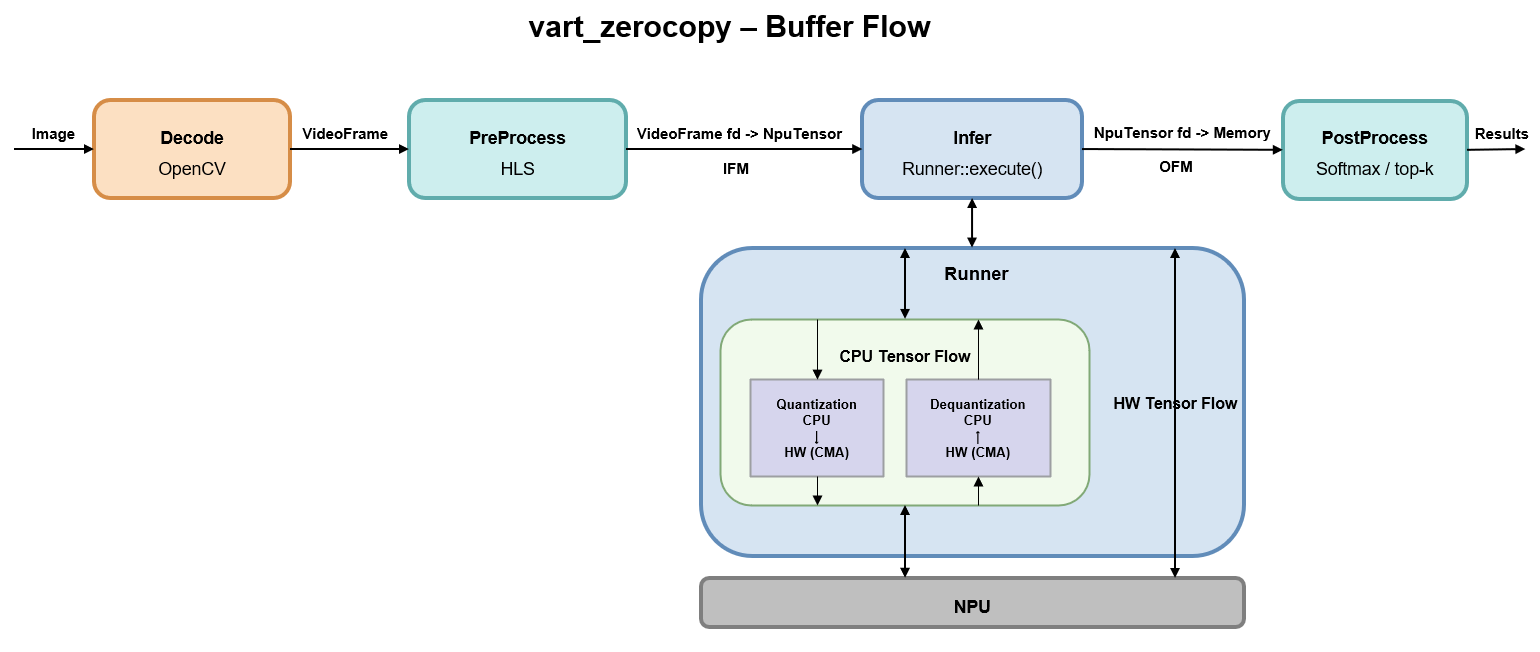
The following diagram shows the buffer wiring used in both modes.
What changes in non-zero-copy mode#
Only the two points below differ:
Step 2 — preprocess output colour-format (see the NPU Format Selection Guide for the full workflow):
Zero-copy: packed RGBx-family (
RGBx/RGBx_BF16/RGBx_FP16) selected from the HW input tensor data type.Non-zero-copy: planar float selected from the CPU input tensor data type —
FP16 → RGBP_FP16,FLOAT32 → RGBP_FLOAT.
Step 5 — what
execute()does internally:Zero-copy: the NPU reads the input and writes the output directly from/to the bound CMA buffers in their native HW layouts — no layout conversion, no internal staging.
Non-zero-copy: the runner reads the CPU-layout input, converts CPU→HW and quantizes it into an internal CMA buffer, runs the NPU and stores output in an internal CMA buffer, then converts HW→CPU and dequantizes the result back into the shared OFM CMA buffer. This translation is hidden inside
execute()and is not visible to the application.
For platform-specific configuration and retargeting preprocess/postprocess for other models, see the sample README.
Comparing Zero-Copy vs Non-Zero-Copy Performance#
The same binary supports both modes, so you can compare their performance directly by running it twice on the same image and comparing the printed benchmark output.
Step 1: Run both modes back-to-back
# Zero-copy (default, HW tensor type)
vart_zerocopy -i /etc/vai/models/resnet50_int8/data/classification.jpg \
              -m /etc/vai/models/resnet50_int8 -n 100

# Non-zero-copy (CPU tensor type)
vart_zerocopy -i /etc/vai/models/resnet50_int8/data/classification.jpg \
              -m /etc/vai/models/resnet50_int8 -n 100 -c
Use -n 100 (or higher) to get stable averages.
Step 2: Read the benchmark output
Each run prints a benchmark block at the end:
preprocess              x.xxx ms / frame
infer                   x.xxx ms / frame
postprocess             x.xxx ms / frame
total                   x.xxx ms / frame
throughput (infer)      x.xxx FPS
throughput (pipeline)   x.xxx FPS
Step 3: Interpret the results
throughput (infer) is the primary metric. It isolates
vart::Runner::execute()and is the stage the operating mode switch most directly affects. Zero-copy reports higher FPS than non-zero-copy; see What changes in non-zero-copy mode above for the per-mode breakdown.throughput (pipeline) includes preprocess and postprocess stages along with infer stage. Both stages also shift slightly between zero and non-zero copy modes due to different preprocess
VideoFormatand different postprocess dequantization path, but the dominant delta comes from the infer stage.The NPU job itself is identical between modes — same compiled model, same HW IFM bytes consumed, same HW OFM bytes produced. The infer-stage delta is entirely the runner-side CPU↔HW conversion and copy overhead present only in non-zero-copy mode.