Multi-Tenancy: Spatial and Temporal Sharing#
Overview#
This guide covers multi-tenancy on Versal AI Edge Series Gen 2: running several independently compiled models concurrently on the same device by assigning NPU column ranges at runtime. It explains spatial sharing and temporal sharing, how compile-time dp_size and tp_size determine each model’s column footprint on the NPU, and how to configure placement through VART Runner options when you create a runner for each model.
For compile-time data parallelism and tensor parallelism (what dp_size and tp_size mean at compilation, and how to set them in vitisai_config.json), see Data Parallelism and Tensor Parallelism.
For step-by-step compilation and inference walkthroughs, see ../cpp_examples/vart_multi_tenancy_guide and the vart_multi_tenancy reference application—a C++ sample that loads multiple model caches from a JSON file and runs them with spatial, temporal, or combined column placement.
Note
Complete Run Your First Inference and Docker Setup before this chapter. Review Data Parallelism and Tensor Parallelism for dp_size, tp_size, and processing-unit concepts used below.
Spatial and Temporal Sharing#
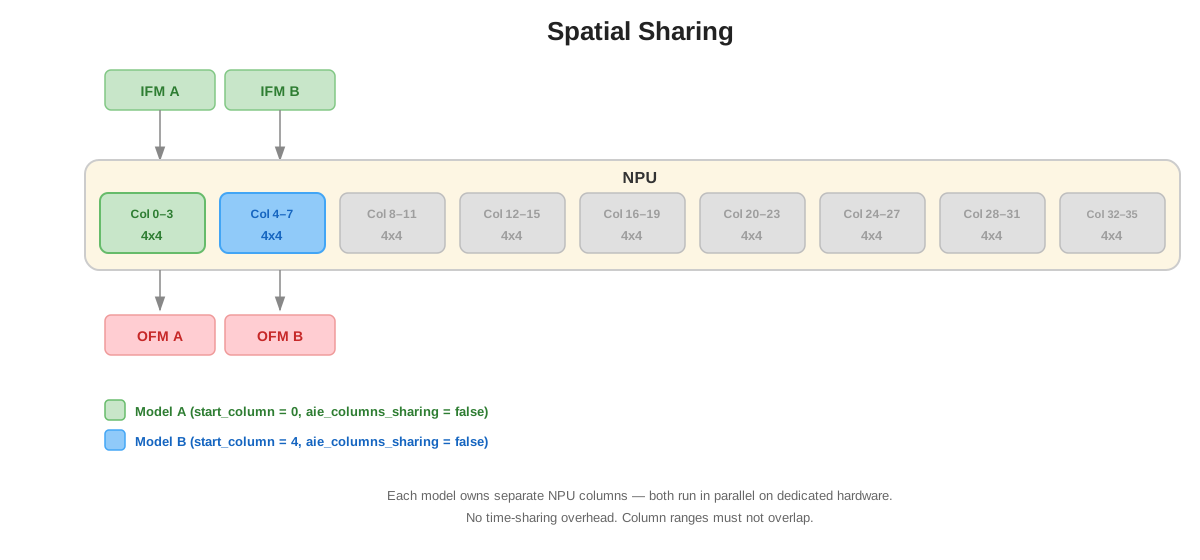
Spatial sharing — multiple models run on the device at the same time, each using a different NPU column range. Models execute in parallel on dedicated columns without time-multiplexing on the same physical columns.
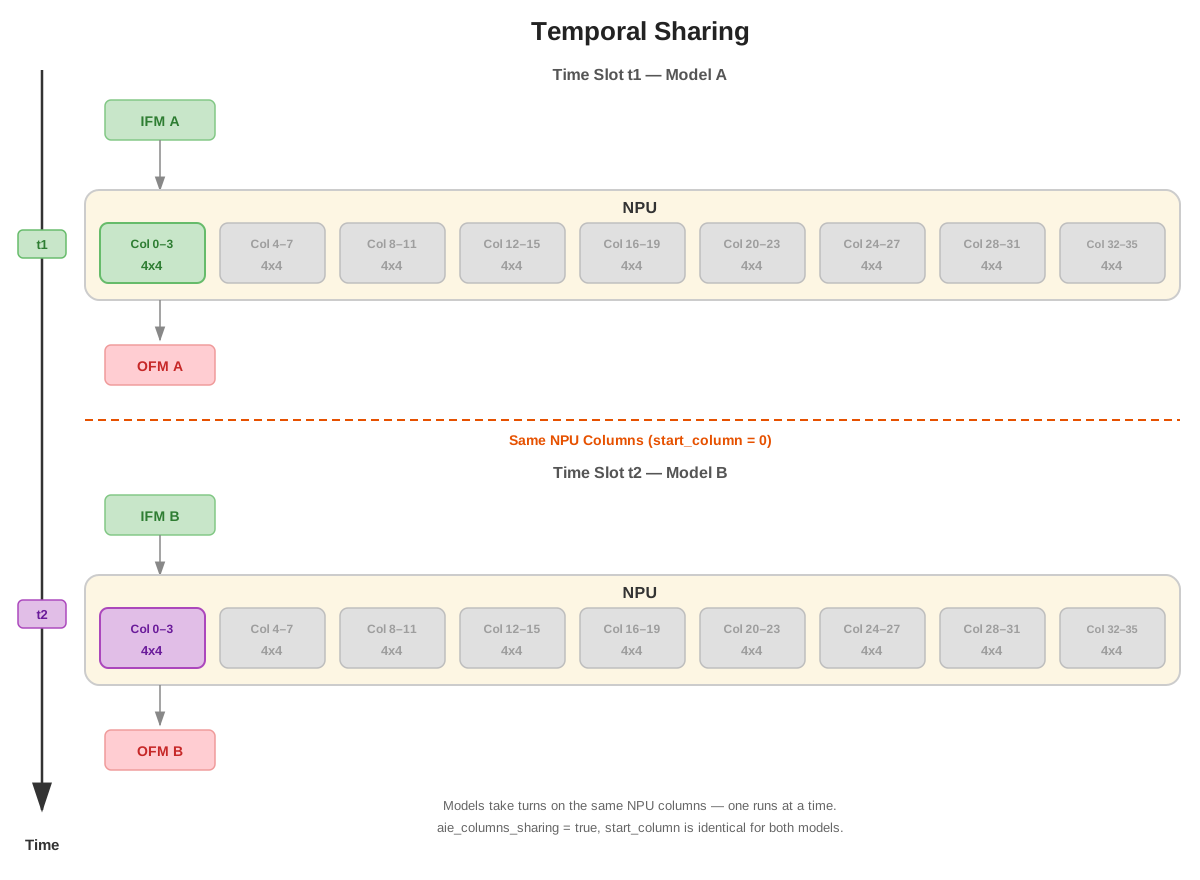
Temporal sharing — multiple models use the same NPU column range and take turns on those columns. Only one model runs on that range at any instant. Temporal sharing can fit more models than a purely spatial layout when total column demand exceeds what the device provides, at the cost of context-switch overhead between models.
See How dp_size and tp_size Map to NPU Columns for compile-time footprint and Runtime Configuration for start_column, aie_columns_sharing, placement modes, and examples.
How dp_size and tp_size Map to NPU Columns#
At compile time, the AMD Vitis™ AI compiler places your model on one or more NPU compute units in the AI Engine array. Processing units are the compute elements that execute model operations; each processing unit corresponds to one NPU compute unit. On ve2-xc2ve3558 and ve2-xc2ve3858 devices, each NPU compute unit uses a 4×4 block of 16 AI Engine tiles (NPU_compute_unit_size = 16 in the compiler guide). See Data Parallelism and Tensor Parallelism for tile-level resource formulas.
At runtime, multi-tenancy placement is expressed in NPU columns, not tiles. The device exposes a fixed number of NPU columns (24 on ve2-xc2ve3558, 36 on ve2-xc2ve3858, numbered from 0). One NPU compute unit = four columns.
The total number of columns one compiled model occupies is:
occupied_columns = dp_size × tp_size × 4
This matches compile-time tile usage:
AI Engine tiles used = dp_size × tp_size × NPU_compute_unit_size
where dp_size and tp_size are set in vitisai_config.json.
tp_size (tensor parallelism)#
tp_size is the number of NPU compute units that cooperate on one inference request. The compiler shards that request across those units to reduce per-request latency (or to fit a large model across more than one unit). Those tp_size units are laid out in adjacent 4-column blocks within each data-parallel replica.
Example: dp_size=1, tp_size=4 uses four units in a row (16 columns total) for a single replica:
dp_size=1, tp_size=4, start_column=0

+----------+----------+----------+----------+
| TP unit 0| TP unit 1| TP unit 2| TP unit 3|
| cols 0-3 | cols 4-7 | cols 8-11| cols12-15|
+----------+----------+----------+----------+
                one inference
dp_size (data parallelism)#
dp_size is the number of independent replicas of the model on the device. Each replica has its own tp_size units and can process a separate inference request at the same time, which increases throughput.
Example: dp_size=4, tp_size=1 places four replicas side by side (16 columns). Each replica uses one unit (four columns):
dp_size=4, tp_size=1, start_column=0

+--------+ +--------+ +--------+ +--------+
|Repl. 0 | |Repl. 1 | |Repl. 2 | |Repl. 3 |
|cols 0-3| |cols 4-7| |cols8-11| |cols12-15|
+--------+ +--------+ +--------+ +--------+
  req A      req B      req C      req D
Combined dp_size > 1 and tp_size > 1#
When both are greater than 1, the overlay allocates dp_size × tp_size compute units in one contiguous column range. Each of the dp_size replicas has tp_size units for sharding a single request.
Example: dp_size=2, tp_size=2 → four units, 16 columns:
dp_size=2, tp_size=2, start_column=0

Replica 0 (dp index 0)            Replica 1 (dp index 1)
+----------+----------+           +----------+----------+
| TP unit 0| TP unit 1|           | TP unit 0| TP unit 1|
| cols 0-3 | cols 4-7 |           | cols 8-11| cols12-15|
+----------+----------+           +----------+----------+
     one inference                     one inference
When you set start_column at runtime, it is the index of the first column of this entire block. The model occupies columns start_column through start_column + occupied_columns − 1.
Common compile-time configurations#
See Data Parallelism and Tensor Parallelism for valid dp_size and tp_size ranges per device and for AI Engine tile calculations.
Configuration |
|
|
NPU columns consumed |
|---|---|---|---|
Data Parallelism 1 / Tensor Parallelism 1 |
1 |
1 |
1 × 1 × 4 = 4 |
Data Parallelism 1 / Tensor Parallelism 4 |
4 |
1 |
4 × 1 × 4 = 16 |
Data Parallelism 4 / Tensor Parallelism 1 |
1 |
4 |
1 × 4 × 4 = 16 |
Data Parallelism 2 / Tensor Parallelism 2 |
2 |
2 |
2 × 2 × 4 = 16 |
The three 16-column rows use the same NPU width but optimize for different goals (latency, throughput, or a balance). Choose dp_size and tp_size at compile time; use start_column and aie_columns_sharing at runtime to place and share those columns across models.
Important
Models that share columns through temporal sharing must be compiled with the exact same dp_size and tp_size. When placing multiple models spatially, ensure the combined column ranges fit on your device (24 columns on ve2-xc2ve3558, 36 on ve2-xc2ve3858).
Runtime Configuration#
Multi-tenancy placement is configured per VART runner when each model is loaded. Call vart::RunnerFactory::create_runner() with RunnerType::VAIML once per model cache, and pass an options map that can include start_column and aie_columns_sharing. See VART ML Architecture Overview for the full list of VART runner options.
Create one runner per model. The following subsections document each option, the placement modes that combine them, and application responsibilities when multiple runners are active.
start_column#
Use start_column to specify the first NPU column where this model’s compiled overlay is loaded. The overlay spans occupied_columns = dp_size × tp_size × 4 consecutive columns starting at that index. How to assign start_column across multiple runners is defined in Placement modes.
Aspect |
Detail |
|---|---|
API |
Pass |
Column range |
Columns |
Valid range |
|
Default |
If |
aie_columns_sharing#
Use aie_columns_sharing to select shared (temporal) or exclusive (spatial) access to the column block defined by start_column. See Placement modes for how to combine this option with start_column across multiple runners.
Aspect |
Detail |
|---|---|
API |
Pass |
|
Temporal sharing mode (see Spatial and Temporal Sharing above) |
|
Spatial exclusive mode (see Spatial and Temporal Sharing above) |
Default |
|
Placement modes#
Combine start_column and aie_columns_sharing across the runners in your application:
Mode |
|
|
|---|---|---|
Temporal sharing |
Same value for every runner in the group |
|
Spatial sharing (exclusive) |
Distinct, non-overlapping value per runner |
|
Combined spatial + temporal |
Same value within each temporal group; distinct values across spatial groups |
|
Application responsibilities
VART does not validate overlapping or incompatible placements across runners. Before calling create_runner() for each model, your application must ensure:
Spatial layouts:
start_columnranges do not overlap between concurrent exclusive runners, and the sum of all occupied ranges fits the device (24 columns on ve2-xc2ve3558, 36 on ve2-xc2ve3858).Temporal layouts: every runner in a group uses the same
start_column,aie_columns_sharing: true, and the same compile-timedp_sizeandtp_size.Mixed settings on the same columns: do not assign the same
start_columnto one runner withaie_columns_sharing: falseand another withtrue. Thevart_multi_tenancysample detects this case and aborts with a diagnostic before creating runners.
Combined spatial and temporal deployments — assign disjoint column zones for spatial parallelism (each zone uses exclusive mode and its own start_column), and use temporal sharing within a zone by giving multiple runners the same start_column and aie_columns_sharing: true. Each temporal group still requires matching dp_size and tp_size.
Example — spatial placement of three models on a 36-column device#
Three models run in parallel on disjoint column ranges. Each uses spatial exclusive placement (aie_columns_sharing: false):
Model |
|
|
Columns occupied |
|---|---|---|---|
Model A (latency-oriented) |
1 / 4 |
0 |
0–15 (16 columns) |
Model B (balanced) |
2 / 2 |
16 |
16–31 (16 columns) |
Model C (minimum footprint) |
1 / 1 |
32 |
32–35 (4 columns) |
Example — C++ spatial exclusive runners#
std::unordered_map<std::string, std::any> options_a = {
    {"start_column", static_cast<uint32_t>(0)},
    {"aie_columns_sharing", false},
    {"input_tensor_type", std::string("HW")},
    {"output_tensor_type", std::string("HW")},
};
auto runner_a = vart::RunnerFactory::create_runner(
    vart::RunnerType::VAIML, "my_cache/ResNet50_INT8_dp1tp4", options_a);

std::unordered_map<std::string, std::any> options_b = {
    {"start_column", static_cast<uint32_t>(16)},
    {"aie_columns_sharing", false},
    {"input_tensor_type", std::string("HW")},
    {"output_tensor_type", std::string("HW")},
};
auto runner_b = vart::RunnerFactory::create_runner(
    vart::RunnerType::VAIML, "my_cache/ResNet50_INT8_dp2tp2", options_b);
Example — C++ temporal sharing#
Two runners share columns 0–15. Both models must be compiled with the same dp_size and tp_size (for example, both dp_size=1, tp_size=4):
std::unordered_map<std::string, std::any> options_t0 = {
    {"start_column", static_cast<uint32_t>(0)},
    {"aie_columns_sharing", true},
};
auto runner_t0 = vart::RunnerFactory::create_runner(
    vart::RunnerType::VAIML, "my_cache/model_time_slot_0", options_t0);

std::unordered_map<std::string, std::any> options_t1 = {
    {"start_column", static_cast<uint32_t>(0)},
    {"aie_columns_sharing", true},
};
auto runner_t1 = vart::RunnerFactory::create_runner(
    vart::RunnerType::VAIML, "my_cache/model_time_slot_1", options_t1);
Reference: vart_multi_tenancy Sample Application#
The vart_multi_tenancy sample is a reference application that reads a JSON file, creates one VART runner per array entry, forwards start_column and aie_columns_sharing to create_runner() using the same semantics documented above, and adds fields for reading IFM files and writing OFM files.
JSON configuration (sample only)#
The configuration file is a JSON array; each object describes one model instance:
Field |
Description |
|---|---|
|
Path to the compiled |
|
Optional. When set, passed to the VART runner as |
|
Optional. |
|
Sample only: maps ONNX input node names to IFM binary file paths on the target. |
|
Sample only: directory where OFM output files are written. Defaults to the current working directory when omitted. |
Example JSON for two spatial exclusive models:
[
  {
    "model_cache_path": "my_cache/model_a/model_a.rai",
    "start_column": 0,
    "aie_columns_sharing": false,
    "ifm_node_file_map": { "input": "/path/to/ifm.bin" },
    "ofm_dir": "./outputs/model_a"
  },
  {
    "model_cache_path": "my_cache/model_b/model_b.rai",
    "start_column": 16,
    "aie_columns_sharing": false,
    "ifm_node_file_map": { "images": "/path/to/ifm.bin" },
    "ofm_dir": "./outputs/model_b"
  }
]
Run on the target:
vart_multi_tenancy --config json_configs/two_model_spatial.json
The sample prints an overlay column assignment summary, validates IFM node names and file sizes, then runs inference (one thread per model). Pre-built configs on the board include temporal_config.json, spatial_config.json, and temporal_spatial_config.json. See the sample README for build instructions and additional examples.
Sample command-line options#
Option |
Default |
Description |
|---|---|---|
|
(required) |
Path to the JSON configuration file |
|
|
Number of inference iterations per model using the same IFM data |
|
off |
Fill IFMs with random bytes; skip reading IFM files and writing OFM files |
|
|
Log verbosity (0 = errors only, 1 = +warnings, 2 = +info) |
The VART-ML vart_ml_test utility also supports --start-column and --aie-columns-sharing for single-model testing of the same runner options without the multi-model JSON wrapper.
Verifying NPU Column Usage#
Use xrt-smi examine --device 0 --report aie-partitions on the target board to confirm column assignment. Run the command while inference is running; partitions are released when inference completes.
Temporal sharing: multiple hardware contexts under one partition index, same column list.
Spatial sharing (exclusive): separate partition indices with disjoint column lists.
See Spatial and Temporal Sharing and Placement modes for how those patterns map to aie_columns_sharing settings.